Last Minute Preparedness for Hurricane Sandy – Protect your chosen shelter.

      AS an OTR Driver, I do my best to stay out of harms way with the truck and trailer, and this morning, before leaving the Pittsburgh, Pennsylvania area, with a load going west, I sent a simple text to be safe and my prayers are with you. I stopped short of the Illinois state line for the night, and like many end of driving days, I watch the news. Tonight’s (10/27/12) news, mostly about Hurricane Sandy. I am compelled to write a Blog, right after I listened to a post recorded Declaration of evacuation from New Jersey Governor Christie. You can find it online (I found it on http://www.msnbc.com).  The Governor made the following statements that echo with me now:

  • The Storm is not to be ignored, and it is advised to evacuate along the beach areas. First safe place should be at one’s home; except those in the evacuation areas, where their “Safe Haven” is at the Counties established shelters (each county will have a list of locations). These shelters are everyone else’s second best choice.
  • When the storm comes in, state repair crews will not go out if high winds are as intense as predicted. You may be without power for more than a day.
  • When the storm arrives stay off the roadways, and inside shelters.
  • Have plenty of food and rations for a few days.

           This is serious. Serious enough for me to sit and submit some suggested notes and warnings. If nothing else, my suggestions will be something you consider and dismiss, or might spark a better plan.

Have a Prepared back pack and suitcase.

      I put this at the top of the list, since although it was stated no one should go outside, if your Safe Haven becomes a danger, running to your neighbor’s place might be your only resort. Have a couple of days clothing, a ration of hygiene products, and a blanket in the suitcase. Have batteries and a flashlights, a portable battery powered radio, and other tools in the backpack. Use the backpack for a simple first aid kit, such as band aids, hydrogen Peroxide, and bandages. A pocket knife and a hammer may be included as additional tools. This package is for the most extreme need to leave your shelter, and only if your shelter becomes a danger to stay in. If windows are not boarded, broken glass does not count as a reason to evacuate. Avoid using the room, and use other areas of the home.

      Since the power may be out, and for more than a day, do not stock up on perishable foods (they will eventually spoil), instead, buy canned processed foods such as Chef Boy Radii spaghetti & Meatballs, Peaches and other canned fruits, dry cereals, and even Maruchan Ramen soup mix packages. Although not tasty when cold and simply adding water, or eating from a can, they are edible as it is…for emergencies like this. Have a gallon of water for each day, and with this storm, plan on four days. The last sentence about cold foods eaten is simply for this reason, if power is out, any open flame, and even the oven should not be used, especially as a heat source for the home. Don’t use candles as a light source. Flashlights and battery operated lanterns are affordable; and the “light emitting diode (L.E.D.)” flashlights last longer on batteries. Let’s face it, if you are told to stay put, you need to avoid any accidents and dangers. If a fire breaks out, you may not have a phone connection, and now you have to evacuate your Safe Shelter. If ignored, at least buy a couple of fire extinguishers. Keep the suitcase and backpack near your door.

      If you did not use Saturday to prepare the outside of your home from flying branches, then use Sunday to purchase some emergency repair supplies. Two rolls of duct tape, and plastic flooring would come in handy for a broken window, to limit the wind blowing in. Still, avoid using that room. Buy enough plastic to not only cover the broken window, but to seal off the doorway to the room.

Stay off the roads…Stay inside

      There have been, and will be those who wish to “experience” the storm. The wind gusts of 80 mph., can toss vehicle of any size, to include semi trucks. If a vehicle can be tossed, a human body can be pushed and dragged along the ground. The real concerns are not only fallen electrical lines, that may still be live wires, and trees, but simply you. If you get stuck in an accident, someone has to risk themselves to reach you, and that’s if someone knows you are there. 50 lives have been reported lost in the islands from this very storm before reaching our coast lines. That count was  after the storm had passed. Choose your Safe location now, and stay inside.


The best plan for preparedness is always before anything occurs

      There are two websites I list, the first Governor Christie mentioned:

The storm can already be felt coming in along the coast. But its real fury is planned for Monday. Use Sunday to get your local paper and see if a shelter plan is listed in your county. You can also arrive to your nearest police station, and try your nearest hospital, who may also have that information. Do not use 911 to simply obtain information. Another possible resource is your local fire and ambulance squad houses.

No one actually dies from boredom

      The battery strength period of a laptop is 1-2.5 hours. If power goes out, you probably won’t have an internet connection, since routers need electricity. Cell phones last longer, and if you have more than one, designate one for emergencies only (when internet connection comes back). Board games still pass the time, and so does a good book. Sing songs on played on the radio, but stay diligent to listening to news that typically start at the beginning of every hour.

I finish with what I started on Saturday Morning,  please be safe, and my prayers are with you all. Who knows, maybe the weather stations have it wrong. Don’t wait. Be prepared, and not scared.
Posted in Uncategorized | Leave a comment

Always Renewing My Business Plan, Activities, Tasks, and Procedures

The Business Plan

If I was to repeat myself, I would have to start out back in 2006, where I sat in my living room of my apartment, in Somerset, New Jersey, with the desire of starting my own business, and me independent. I found a website, My Own Business, Inc., that helped me with getting started, with the simplest of basics in building towards calling myself a business. It was the first certificate and understanding in being a Sole Proprietor. The next step was creating a location. I focused my research specifically through the website, and found a location in Forest City, Pennsylvania. It was to be a school room, and a service location for PC repair. All went well, until I moved to Forest City, and had to redefine my business plan, settling on a garage. Something changed in 2006, and I wouldn’t be fully aware of what was happening, but all my windows of opportunity were quickly diminishing, and I could not get any further than establishing a business name, a business plan, and a workshop. It turned out the economy fell.

It was by personal reasons that I invested my savings into a Commercial Driver’s License (C.D.L.), and would fight to work in two different fields, Computing and now, Professional Driving. I was and Independent Contractor for a company in Georgia, who found computer maintenance work in my area of Pennsylvania, while I schooled at Smith & Solomon Truck Driving School. My intent was to drive for a few weeks, and then (even back in 2006) Switch Gears to working with the company from Georgia. It was a pace that was not only exhausting but unable to manage, since some time away from a company truck, meant trying to have work ready when I went back to Computer Servicing. All this, while the economy continued to fall.

I did everything I could to keep up the pace of being available for Computer service and repair, while exploring the many opportunities and positions in Professional driving, and in three “quick” years, I had driven coast to coast in dry van trailers, pulled refrigerated loads, crossed into Canada with Double Trailers, and worked with a 6 month contract on a Northeast Dedicated “forced Dispatch” position. What started out as a 50/50 proposition was about to become a 5% to 95% ratio, as the economy never hit bottom. I spent so much time cutting my costs and spending, but fell short (like many other individuals), and found myself in debt. I was no longer just struggling. The road took me to this Lease Purchase to own contract (thus, the 5% computer-95% professional Driving ratio). Three years later, I now have six years with a C.D.L., and almost out of a huge debt, but fell behind on my financial obligation with the Revenue Department. Still, I got out of a huge hole, and completed the calendar time of a lease, and what was looked at as a bonus to own, may be the new beginning to a proposed business, that still shares the idea of Trucking and computers. The truck, now the true meaning of switching gears, combining Professional Driving with Technology.

The incentive to keeping the dream alive came from the Professional Driver’s in this  lifestyle, as I saw more and more truck drivers using computers, iPads, tablets, cell phones, GPS Programs, and computer logs (there are three products I know of, and two worth really exploring; all three hold its own worth, in my opinion). Even with the changes in the need to have a tracking system in commercial trucks (EOBC’s), it still does not take away the value of personal computers, used in this field. In short, where my original business plan started me in a small town of Pennsylvania, my combined interests in keeping busy in two fields showed promise towards future Videos, concept classes, computer servicing, creating my own computer software products for sale; anywhere in the nation (with a twist), whenever the truck was no longer pulling freight, and “ the engine was turned off”, the Commercial vehicle has the potential to be that mobile office…anywhere it was parked ( A long way from a small town project, but with so much more to consider before it becomes more than possibilities). There is a market out here! Just like the still much alive C.B. Shops. Pulling it off involves more understanding in sales and services, taxes and state regulations, but it is starting to look like a real possibility. By the way, the real office is not the truck, but will always be the computer. The truck remains just a means to be anywhere in the country, simply holding all the tools of the trade of any cubical, office room, and shop, established at a fixed location. My office can be carried in a bag, a second bag for the printer or scanner.

My Activities

Again, back in about 2008, I came across a Professional Driver, who used a spreadsheet for ever load information, fueling, income, and expense. I was excited! Someone with a C.D.L. was using an Office product, and was expanding to use it to its potential (as he learned more of what it was capable of). I watched others exploring map programs on computer, just before the explosion of every driver investing into a GPS device. It took three years for me to build my workbook for the same role as that driver who built everything one one spreadsheet, and my Microsoft Streets and Trips, and DeLorme Atlas USA (with Earthmate GPS device), and make it part of my role in the daily work of commerce. It wouldn’t be until three more years (through that lease to purchase program), that it became the routine I live by. I am still short of the crucial financial and tax routine of timely responsibility, but I have so much to personally feel accomplished. I have booked three complete years of workbooks that contain all information for loads, expenses, Income, maintenance (short of making a spreadsheet for future DVIRR); all of which should be the same records kept by the contracting Corporation. My records should match their records. By back tracking, I will eventually have my last six years in this trucking role on record.

My Tasks

I have a list of started projects, much in the form of databases, with my key focus on the Driver’s Database project. This database contains fuels stops, weigh station location, Repair shops, state information numbers, and customer/ load information. It is only about 31% completed. It will eventually become a program for retail. It will possibly become a “released BETA” before it is completed as the first version. There is just so much information to include, and I still need to build it’s ability to draw up specific reports. There is also the need to personally build a Database library of backed up data files, DVDs, and their locations. This database will eventually also help in not redundantly back up the same static records that won’t be updated. The Blog Tasks came short of a timetable, and is far from ever being a routine, but I will keep trying. The small video “How To” Videos remain not started, but remain a goal to achieve. Making my email and social surfing a daily routine seems to be my next focus. My family would love to keep in touch with me (along with those I am a customer with…not to forget those in the Revenue Department). What has shown improvement, when it comes to business development, is the voice communication, relating to the PC–to-Phone. I started out using yahoo! Unfortunately, for the mini computer, the conversation for the person on the other line had issues (sometimes only heard a part of me, and sometimes could not hear me at all). Skype championed over Yahoo! when it comes to mini computers and the use of PC-to-Phone. There is still a delay in communication, but, I had a one time video call with my Sister-In-Law, and the belief in video calls and future conferencing calls was that more real to me! I again, am so excited! I still have Yahoo! All voicemail still can be sent to my email account….but now by two different phone numbers. I really need to master in checking my mail everyday.

My Procedures

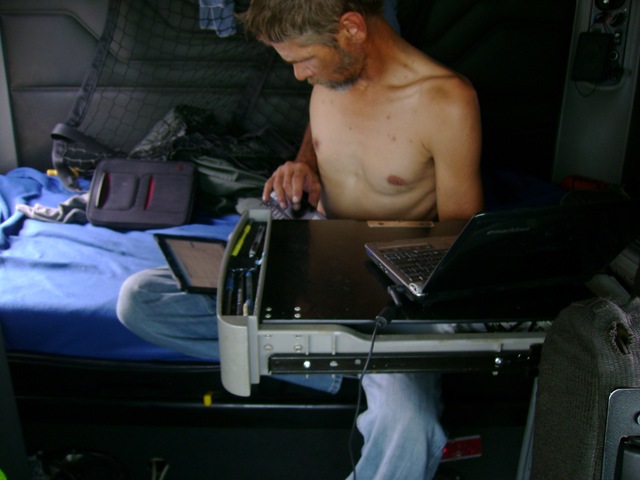
      My day begins like everyone else, by washing up, and getting dressed, except the main computer is turned on, while I put on my pants, and clean the floor. I get the printer setup, and the next step is to complete and print the Driver’s log from the day before (a step left to be finished, since typically the log needs to wait until after midnight), and filling in yesterdays, miles, worked hours, driven hours, and hours coming back [recap] on a printed page that is identical to every drivers recap table. If needed, the paperwork from the load delivered at the end of the day is prepared for submitting to the company, along with my Driver’s logs, scale ticket, and receipts. Then, I leave the truck for breakfast (or at least a cup of coffee). I come back, and set up my scanner, to scan the same work that was scanned into the company (my records match theirs), and I record the submitted the paperwork on a spreadsheet; scanning and recording my fuel stop,SUNP0005 when I can find the time (sometimes it piles up for a couple of days). I look over my next trip, and see how long I estimated, using my Microsoft Maps & Streets. Finally, it is time to straighten up my bunk area, and start up the EMachine that records and tracks the days movement of the truck (it is also the faithful “underdog” that runs the Skype program efficiently). Time to switch gears. While the second machine is starting up, I begin my Pre-Trip of the truck and trailer. I hop in the truck a couple of times for my air gauge or rag, reaching over to plug in the Earthmate (into the EMachine). With all Fluid, tire pressures, physical structure of both vehicles (a trailer is technically a vehicle…it is registered by States), I return to my Driver’s Daily log to make sure I log it as I go. My day has begun. Along the way, with every pickup and delivery, the main computer is turned on to record the load information, the stops for fuel, and the driver’s daily log, as a Log it as I go (that means for every time the driving status changes, I catch up on my log), and finally open my Microsoft Streets and Maps, and update each stop time, and see if I am still on track. This also givers me the opportunity to check out my route I chose to drive. By the end of the day, I record my ending mileage, fill in the miles driven, work hours, and driven time, the recap table, and it is time to do a post trip. The computer typically is shut off, after I submit my Post-Trip information (and any maintenance repairs done during the day), updating my Microsoft DSC06918 Streets & Maps, and drawing the line that shows I am now off duty, in my Driver’s daily log.

I still need to make checking my mail a routine… and saying “hello”, and, “goodnight” to my friends and family. All in all, I have a routine that took three years to develop, and another three years to justify it as my routine.

This has been so much work in developing, and that was with the ratio as 5:95. I don’t ever see me being able to make this a 50-50 proposition, but I know I can come close to a satisfying dual role in the future. There is a market out here, in the professional driving environment…and it includes the use of technology, both at a corporate level, and for every willing professional driver. Over time, I do see the future conferences done by video between those in the office building, and those professional who work in these “ten wheeled mobile office’s”.

There is more development going on for me, but until I get there… a quick shout out to my father, “HI Dad! I am doing just fine. Luv Ya’, and I hope to see you soon.”DSC06911

Posted in Computers and Technology | Tagged | Leave a comment

Labor Day Weekend 2012… a weekend to simply catch up.

      When Friday came, I was rolling from Detroit, Michigan, right to the Louisville, Kentucky yard, and was excited. This weekend ended the calendar period of a contract; which was drawn from an originating three-year contract. All This for a truck, right? No, I did it for the time period. The truck was originally the bonus, and was to become a studio of sorts. Still, there is the remaining figures, and getting the title…all in good time.  The fight really was to accomplish three years of records keeping, and developing workbooks and database projects, and most importantly, do it all on computer. Others do it, why not me? These three years was to be able to keep all records in tact, and except for building a summary workbooks on all the paperwork a driver gets to acquire, I surpassed the period I set myself up for.  The contract was the second, but just as important to complete, since much time and money went into the Lease to purchase.SUNP0004

The two-year period was the hardest to get through, since the ambition was not into this career area, but to obtain all I could and see it as a market for other services and products that involve the computer. Something changed though… I don’t know if I was looking for an earlier cut-off period, but I think I had got accustomed to this lifestyle. I thought making it through this contract would leave me with a feeling of accomplishment; instead, I feel it is “just another fun-filled day in paradise.” I do know that over this weekend, instead of seeing the routine built on a daily basis, I started wondering why I could not get past the “switching gears” concept. Now, I need to take it further, and work on that concept. Besides, with the ownership of the truck, the levels of Leasing it back or full ownership made me realize, I still have so much more to understand and master. Plus, it gives me opportunities to continue building workbooks of “real time” data, to be used to learn from later. Have I become a Professional Driver? No. Because the love of this work was never built inside of me, I’m more like a computer Geek, who so happens to have a CDL [and truck]; in fact I am not a truck driver, although, I have played the role daily, for the last six years.

     These Blogs have challenged me to go back and update the 100 day countdown project, that never was able to be done weekly, let alone, on a daily basis. I actually  have considered “scrubbing” the project all together.SUNP0004

With the remaining winds of Hurricane Isaac working its way through Kentucky, and a change in scheduling for the trucks quarterly service, it gave me time to complete DVD backups, and remove other files off external drives, and start focusing on 2013. More videos, more pictures, more Blogs, more social networking, and even work on seeing family again. Maybe that is where the lost excitement went; I haven’t seen family.

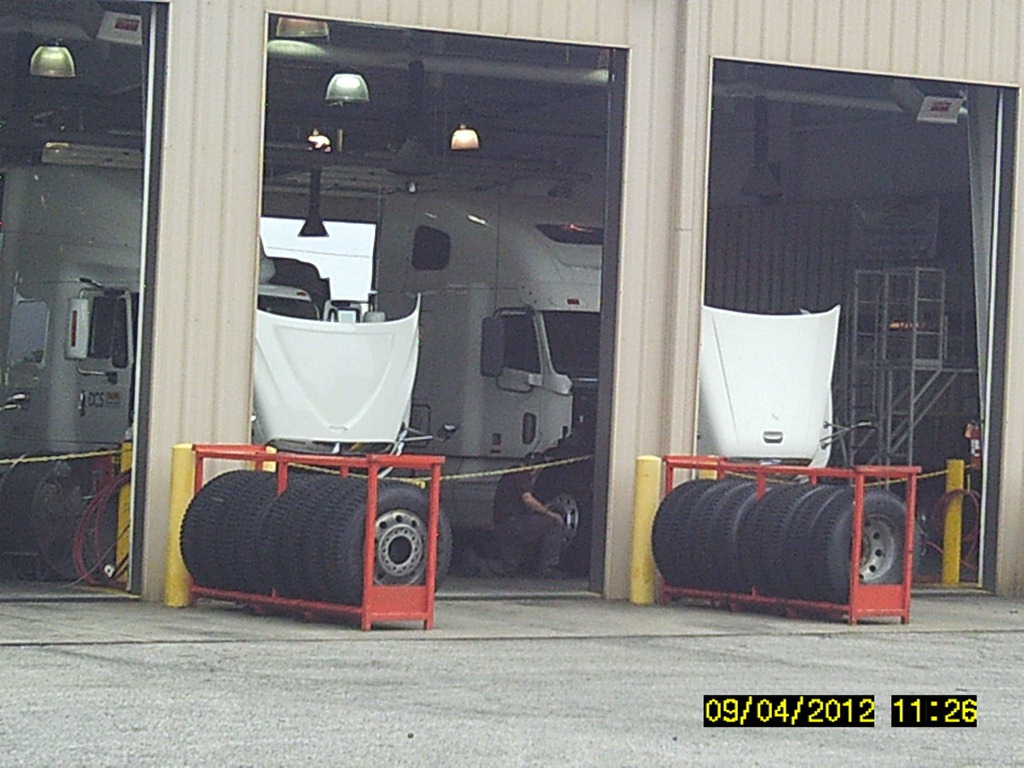
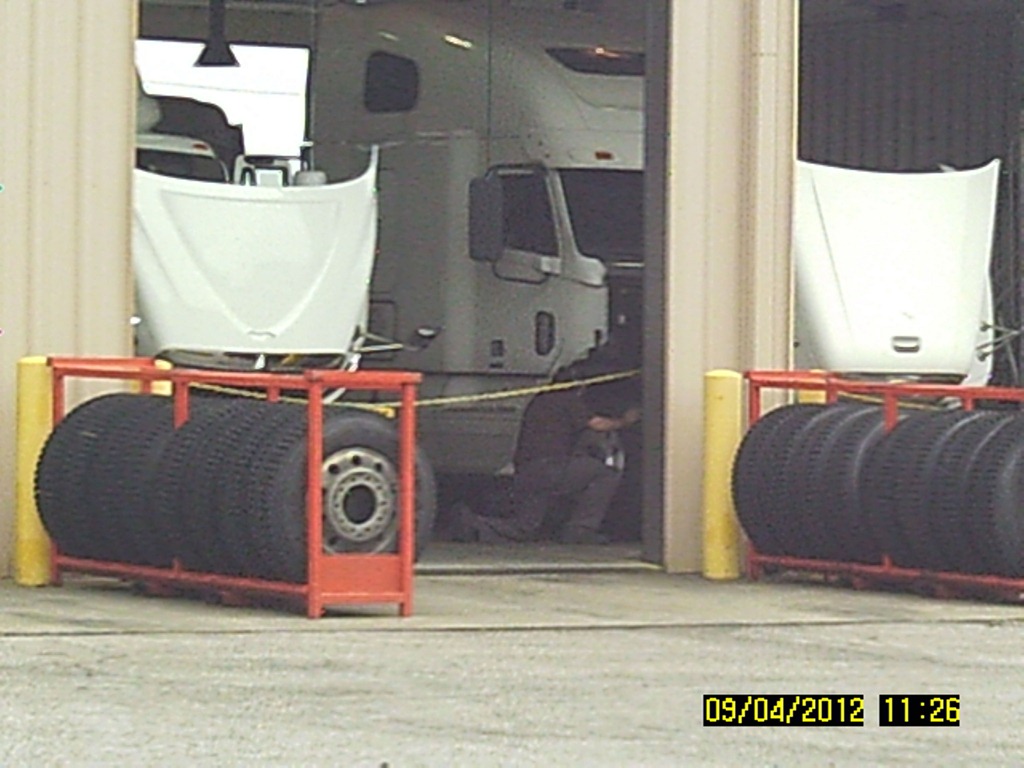
I took all day Saturday to complete the moving and elimination of old files, while preparing my records for the month of September. I also got laundry out-of-the-way.  I keep thinking how I wish to approach the unfinished project. Should I just move everything over to the Driver’s Log, or do I make another 100 day trial of the site it continues to be on? The truck finally went into the garage to be serviced, my files backed up, and my spreadsheet ready. The time now is on the fate of a countdown I could not do while rolling daily, and if it would hold the same impact. I think I’ll try moving it over to one location. And that will finish this day. So much got done this weekend, so much planned for the future.SUNP0005

Posted in 100 Day Countdown, Down Time, Truck Driving | Leave a comment

Closing In On Ownership (My Own Worst Enemy)

Every milestone has its purpose, whether it is a reflection to a beginning timeline, or a proposed second starting point or second wind. My true milestone will be 33 days from now, and the completion of a contract. Ownership of the truck is what a Professional Driver strives for, but my claim remains the timeline to completion. The truck is a welcomed opportunity. My sights still remain on running a business that involves computing, but due to an economic fight to remain financially operational, it was the unintended move to possess a Commercial Driver’s License that kept me going…or should I say rolling.

It hasn’t been easy. I was sometimes my own worst enemy. Although, since 2006, and with a “track record” of five month, six month, and eight month employment periods, I have gained a little understanding in Over The Road (OTR), Dedicated, Commuter Transportation, Refrigerated Transportation, Intermodal (shy of actually committing to a rail dedicated), rolling with Double Trailers, and even Canadian Crossing, with commercial loads. All that in just the first three years. I express that  because a couple weeks before the completed contract, I will have been in possession of a CDL for six years. I still reflect on my experiences, and will actually admit that although I have been in this Profession for that long, I am far short of those more senior in experience. I will say that the lack of confidence is almost “nil”, but some challenges and much needed habits still make me realize that I am in need of more time to actually call myself experienced. My folly to this is that, “the most experienced professional driver never makes it a point to boast about his experience….there are others around them that do the talking for him/her.”

But I am approaching a new crossroad of lessons. I have actually “pulled back the reigns” on attempting to be fully independent; mostly due to the lack of routine (rather than level of responsibility), when it comes to the financial aspect of running a Commercial Vehicle. I do know enough to go ahead with that next step, but the lack of discipline, well, I truly cannot ignore.

Then, there is still that main vision of this “Business Plan” to continue to incorporate and promote computers in the trucking environment. I already stated that I am my own worst enemy. With only six years experience, even I know, the main focus needs to be on Transportation, the federal regulations, and finance. This doesn’t mean I am a risk. It does mean that to everyone else, I have created more work for myself. Typically, those promoting products relating to the computing and technology field gather information or at least a basic understanding, and improve on their “mousetraps” over time. The work and concentration in becoming fluent in two different and diverse professions /trades can be daunting, and never to be attempted in so many other opinions. Even I need to point out that your main focus should be always in one profession or another…never both. And like falling short of being that “true professional”, I still fall short of totally immersing myself in my real love, and invest in certification (for which I know I can easily qualify for, or have the incentive to achieve).

So, why do it? Well, the truck will always be a focus towards Interstate Commerce, but it also will have the proving grounds for future technological challenges…and opportunities. I have always tried to be the first to own a new toy in technology and become proficient with it. Sticking with this “Field of Transportation” holds a fantasy of seeing the next big opportunity, and still assist others in understanding and getting the fullest potential (and understanding) of the current “toys” on the market. Why do I express technology as toys? Two reasons: First, I have too much fun learning new ways, and constantly challenge myself to get better with what I even currently own; the second has been first addressed in this blog….”the roll as a Professional Driver is to dedicate one’s self in to always improving themselves in becoming the safest, and most proficient experienced driver on the road, and under many extraordinary circumstances“. No exceptions. If this cannot be achieved, then something (either the love for computers, or the CDL)has to be given up.

Like I said… I am my own worst enemy.

Posted in Computers and Technology, Truck Driving | Leave a comment

Workbook and Spreadsheets [ Doing the Math]

 Note: This Blog was written to gain interest in recording data using general spreadsheet, found in workbook programs, such as Microsoft Office Excel and Microsoft Works, Lotus, and other named spreadsheets to include Sunsystem’s Star Office. It was not to answer every possible use, and some programs are designed to work differently. There are many well written books for sale that will go into great detail in the uses of these programs. This is simply an introductory to inspire the user to explore, and make use of these programs.

Setting up Second Sheet

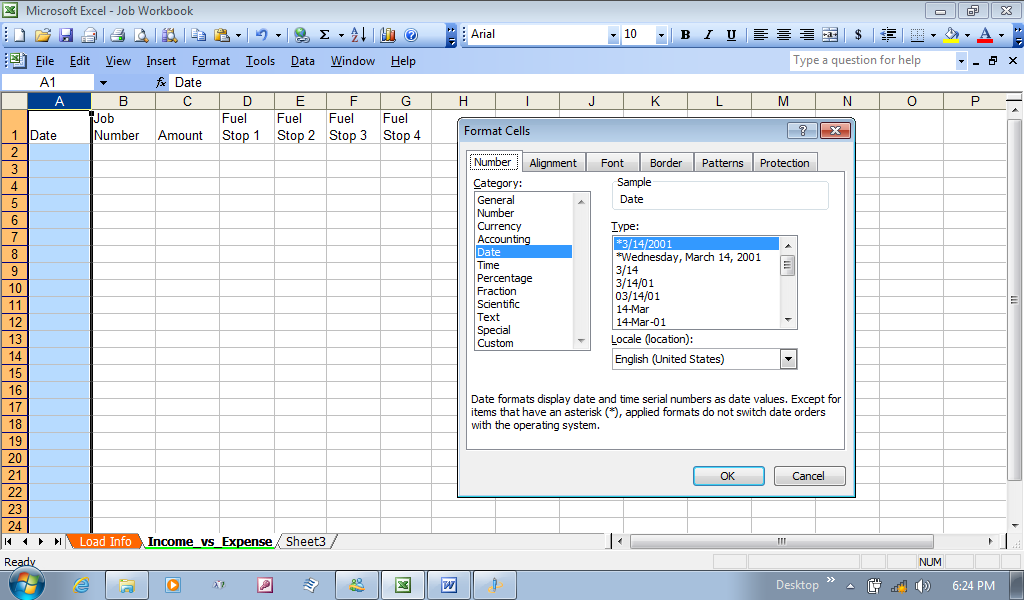
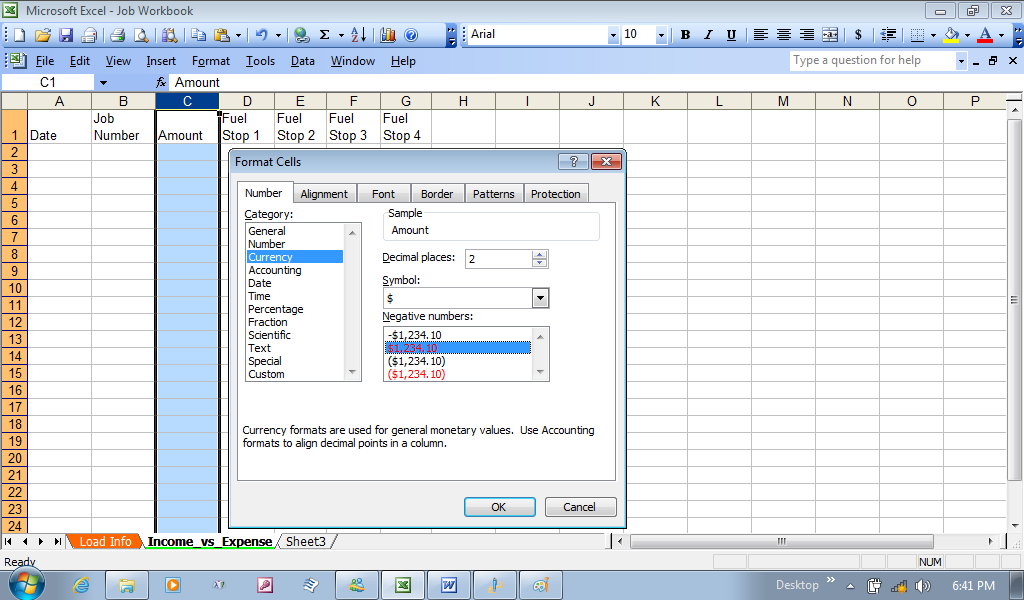
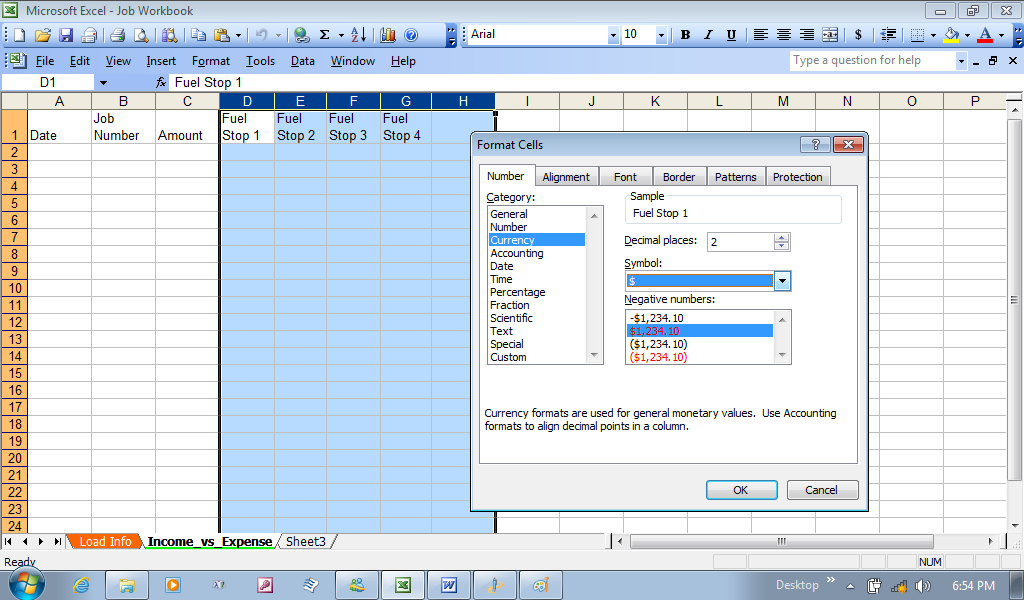
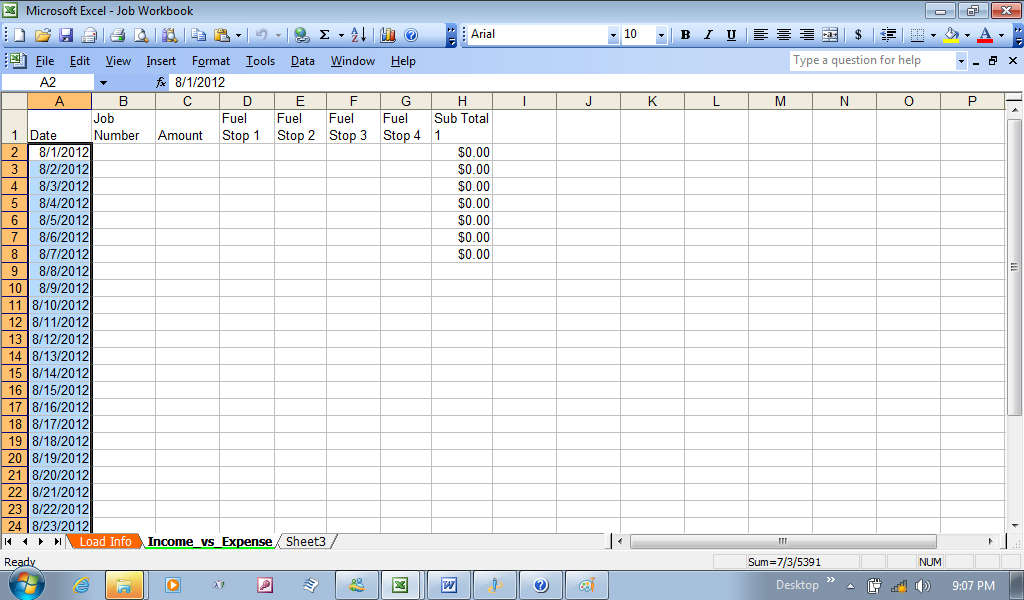
I want to point out that Microsoft works only opens and uses  one spreadsheet at a time, but in many Office programs start out with three blank spreadsheets (respectively, sheet 1, sheet 2, and sheet 3). I already covered how to rename and color code the bottom tab of the spreadsheets, and how to format columns and rows, and I began with naming the second spread sheet “Income vs. Expense”. And like the first spread sheet, I started the first two columns with the date, and then, the Job Number. From here, I made the third column thSettingUpStarte amount of expected pay for the job to be listed next. The following four columns, I listed the biggest expense to running a truck, and that was Fuel (Fuel 1, Fuel 2, Fuel 3, and Fuel 4; you can add more or less, but for an over the road driver, driving coast to coast may even need two or three more columns. And as a reminder, I clicked on the first column (column A) and right clicked, then chose format cells and chose date. The next columns I’ll work on is the Amount (Income) column, along with the Fuel StopChanging ColumnsCurrency Columns. They will all be done the same way, and be for currency. Like I did with selecting the category for the date, I now chose the currency category. If you look at the window to the right, you can also select how to express the currency when the numbers are negative, and I will show that in the column that will do the math (not yet made up). For now, just know you can do one column at a time, or select all the columns by clicking on the Amount Column (Column C), and while holding the mouse button down, slide to the right to highlight the columns to the right. I’ll express this with Columns D through H; Remember, I am about to add another column that will do the math, so while I know what I want to do, might as well highlight it now…you can do one column at a time if you wish).

Changing ColumnsCurrencyMultiple By right clicking, I again choose Format Cells, and in the Number tab, I select Currency in the Currency window, and chose to just show the numbers as red instead of a minus sign, when the amount is negative.

Working with the formulas…

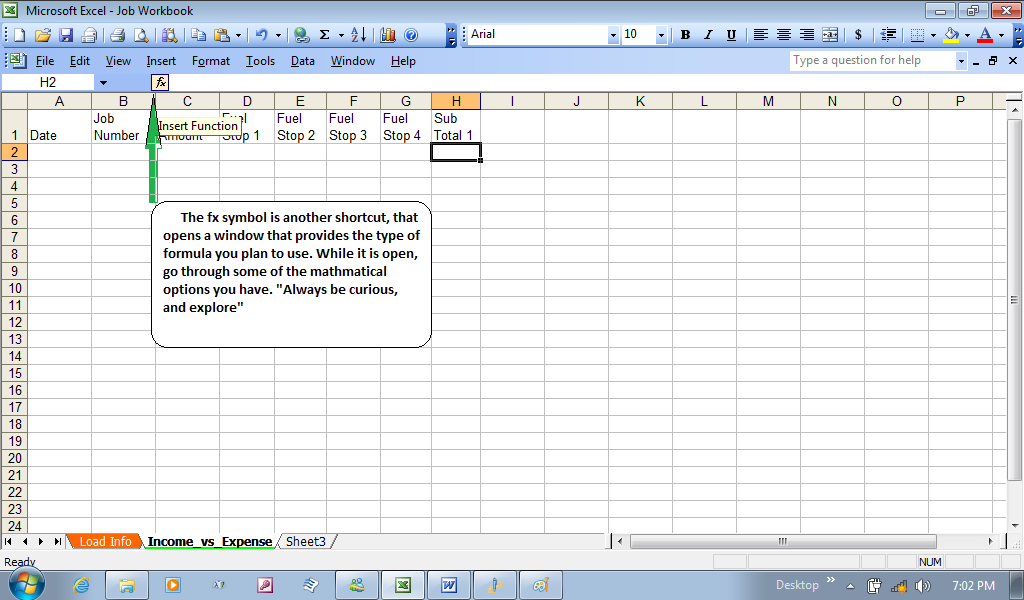
Functions shortcut

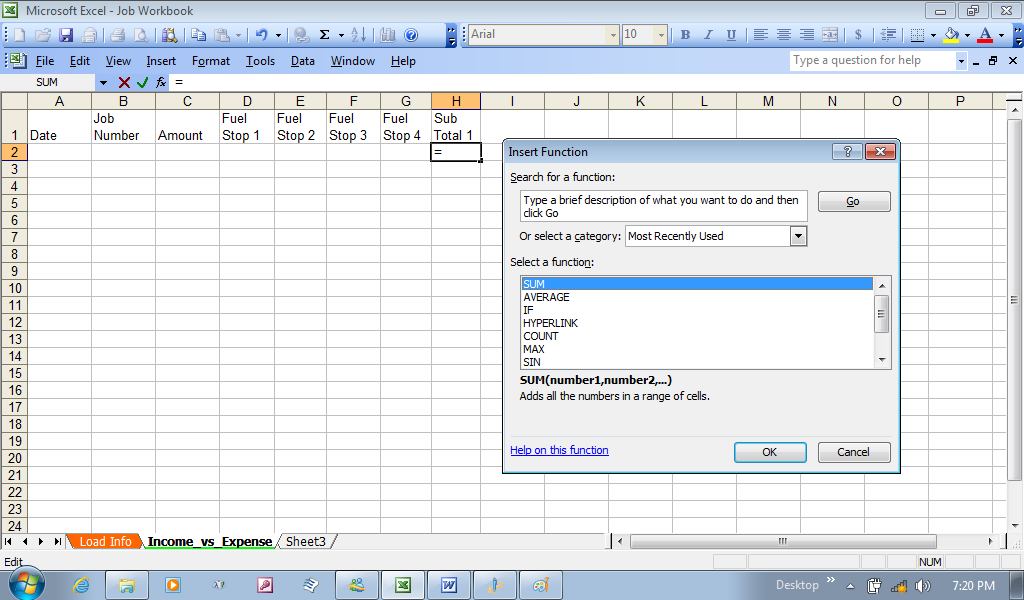
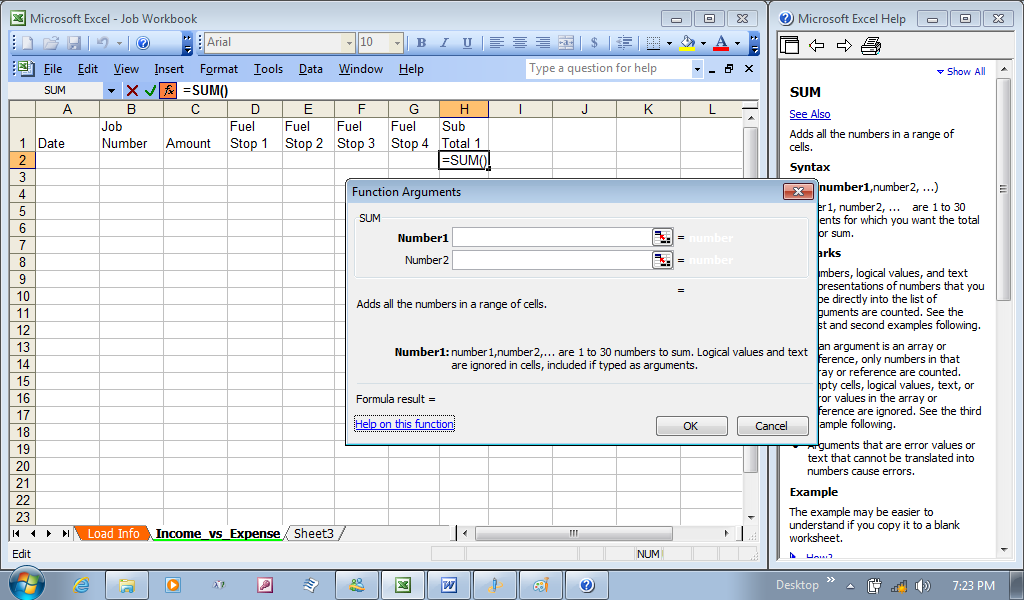
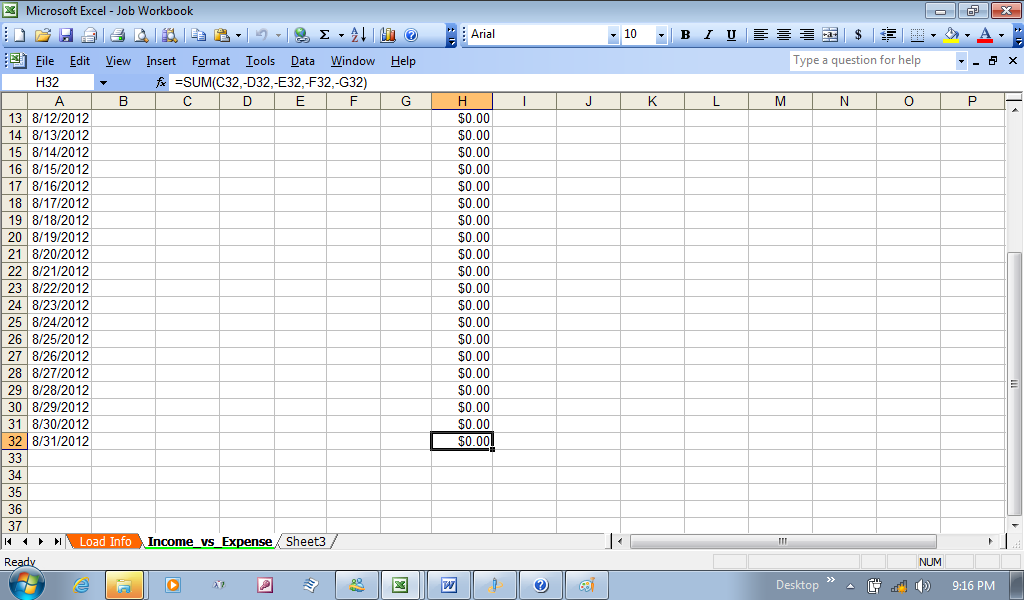
      I now went to that blank column, and gave it a name as “subtotal1”. You can call it “total”, or “Difference”, but I know that it only will add the fuel, and subtract the fuels sum from the income; but fuel is only the biggest expense. The truck will need oil and other fluids, parts I can replace, like window wipers, and cleaning materials. I will also make another spreadsheet to cover miscellaneous expenses that will cover replacement parts, such as those wipers, lights, and maintenance supplies. I only named it “subtotal1” to Insert functionexpress that this was only one step to figuring the amount left over, after fuel is subtracted from the starting amount. I will leave the category of sum highlighted, and click the OK button. Note: I only chose one cell, “H2”, right under the subtotal1 cell (H1).

FunctionArguments

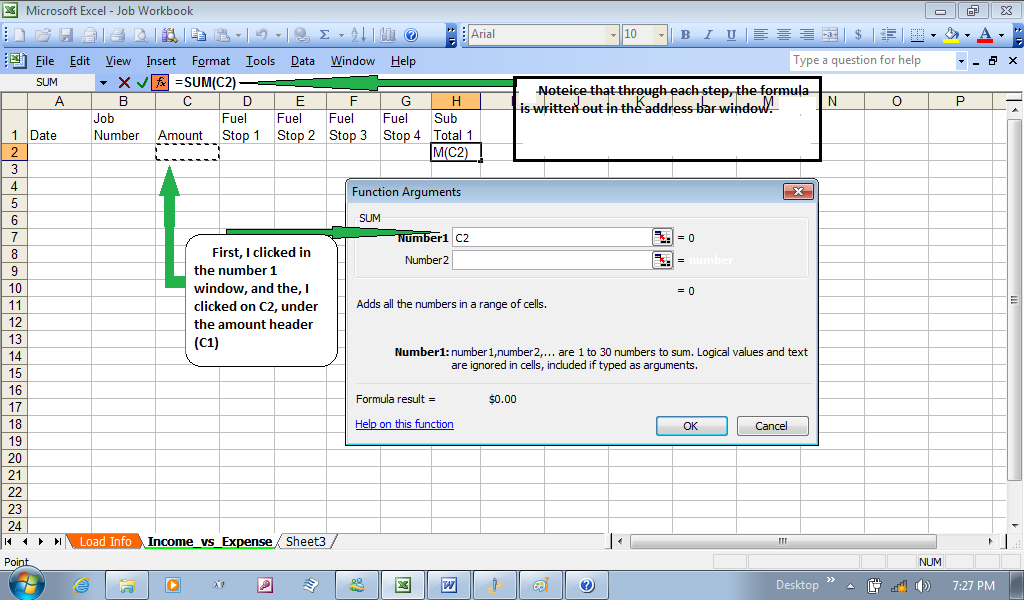
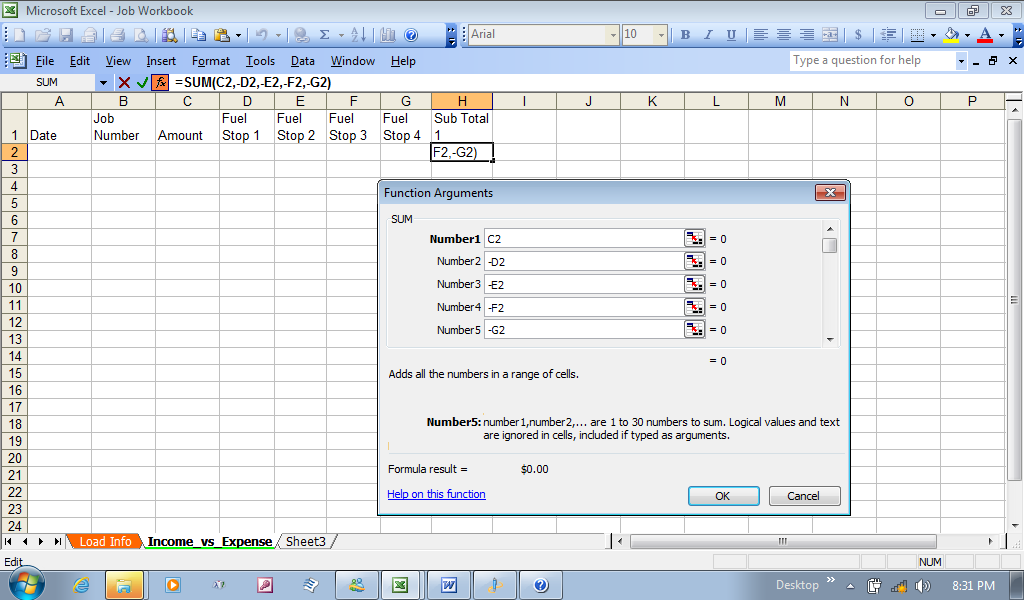
Once I clicked OK the window closed and opened the functions argument window. My next step is to click in the first window “Number1”, and then, go over to the cell under the amount, and click on it. C2 is automaticallyClickingAmount added to the “Number1” window. Next, I’ll go back to the function arguments window, and click in the “Number 2” window (and notice it automatically creates a “Number 3” window underneath).  Here I’ll add a minus D2 (-D2), then go to Number3 window and type in –E2, and continue until numbers 4 and 5 are filled with the other cells under their respective Fuel stop header. Then clickSubtractingfromC2 the OK button in the functions argument window.

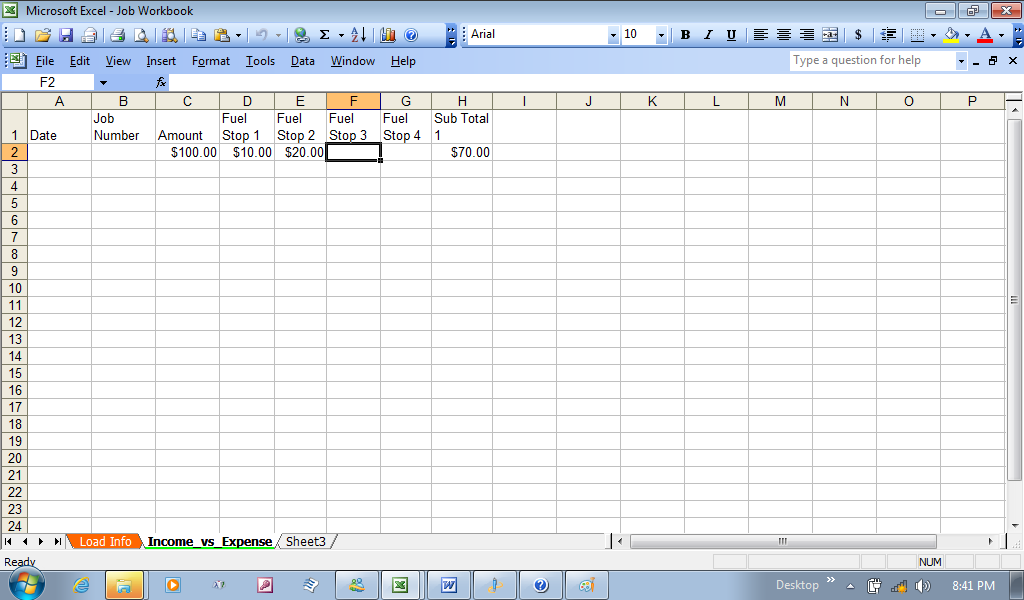
To test this, let’s add an amount of 100 in C2, then 10 in D2, and 20 in F2. Each time you can see the results in H2 actually subtracting the added numbers to each fuel stop cell.Functiontest1

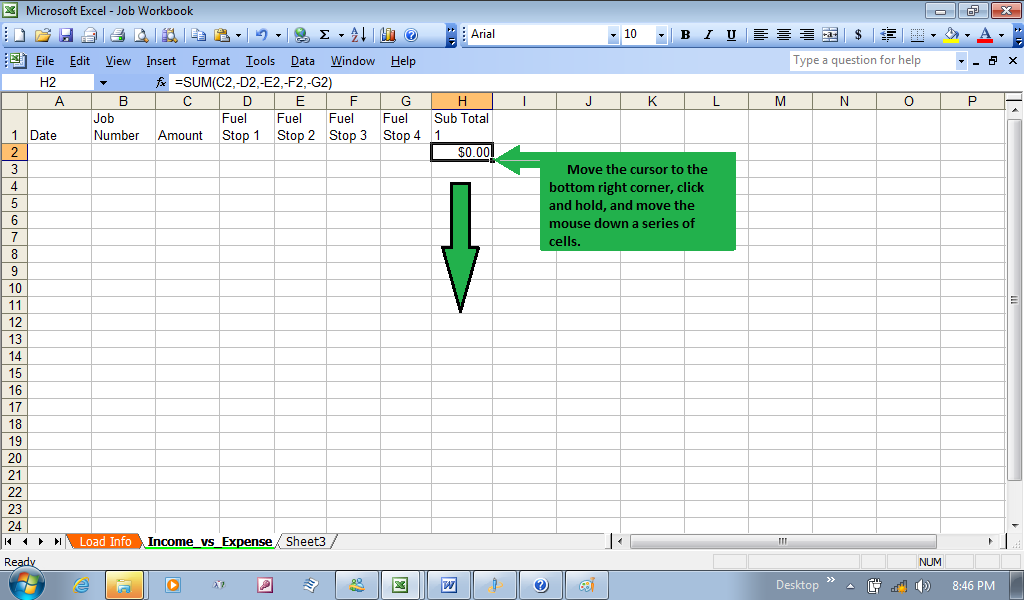
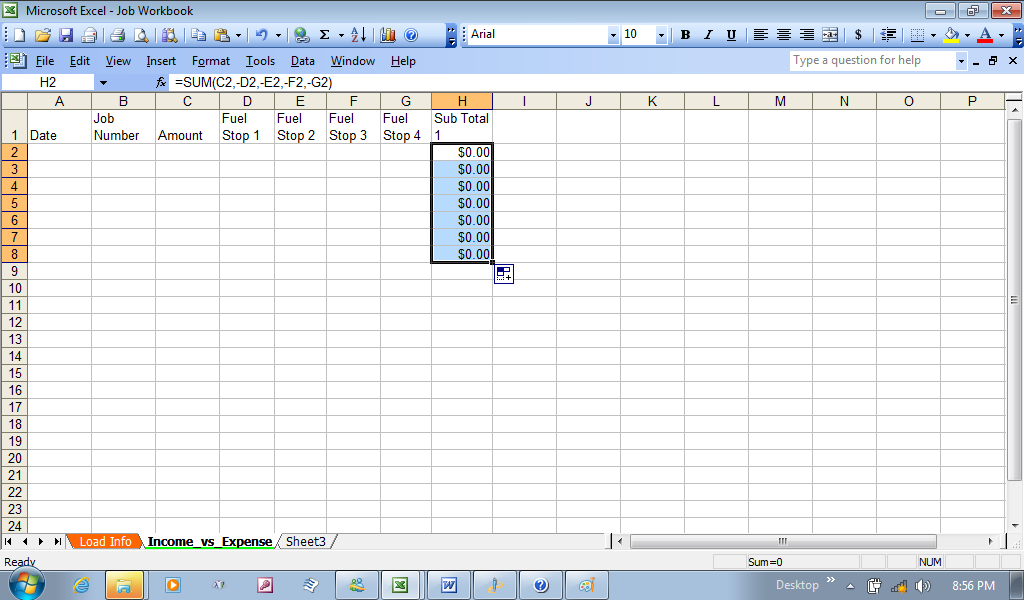
After your satisfied with the trial, remove the added information you used to test the first row. You probably do not want to do this every time. So, AutoFormattingclick on cell H2, and notice the little square in the bottom right hand corner of the cell. Move your mouse until the cursor is on the little square, click and hold and drag the mouse down to highlight as many squares you desire. This is known as auto formatting.DragAutoformatting

I only went seven down for now. You can always click the last dragged square and repeat the process of clicking and dragging to add more.

More Auto Formatting

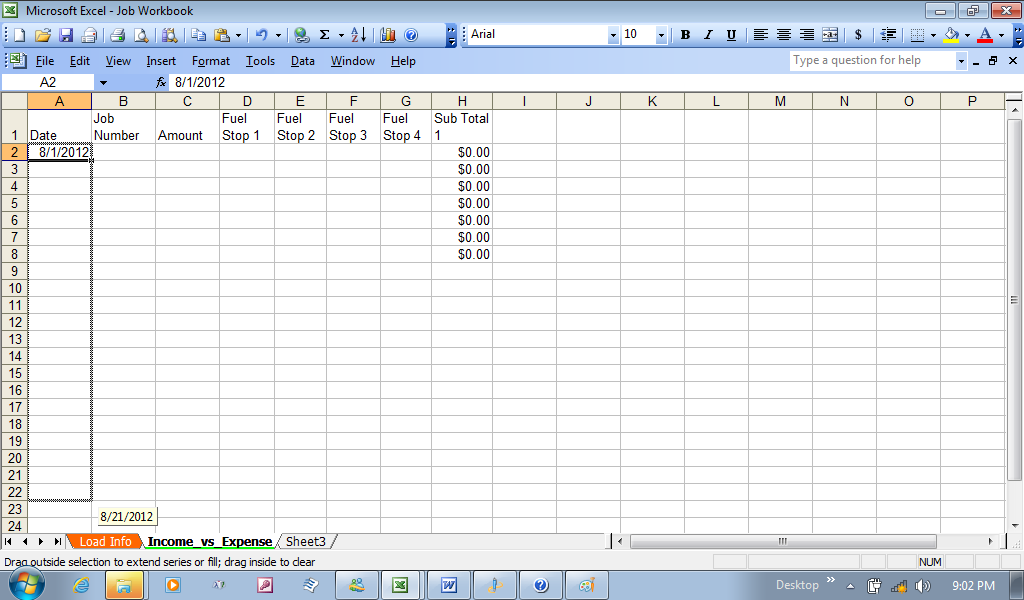
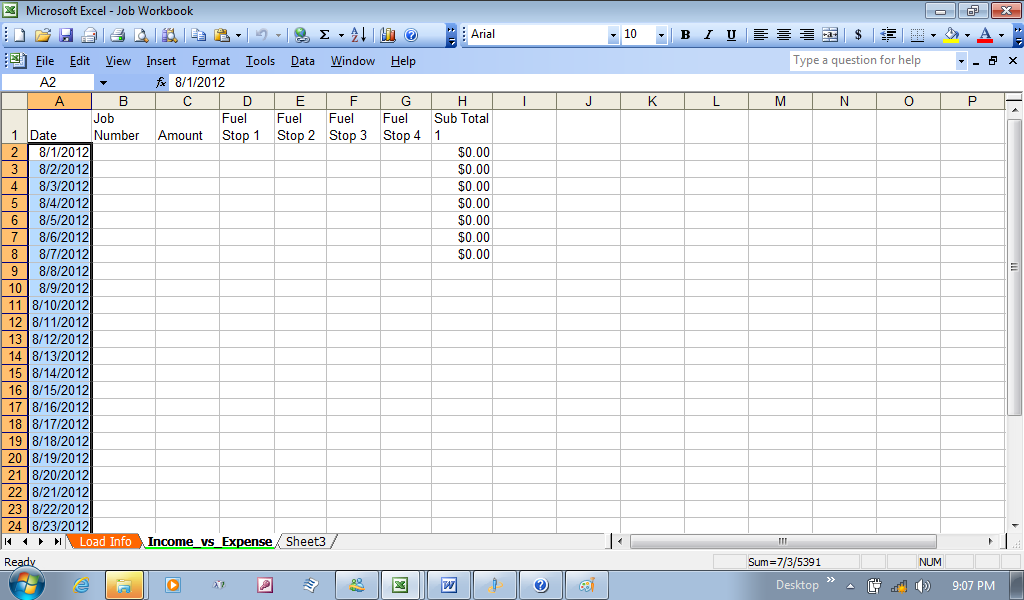
AutoDate      I wanted to actually wanted to show more real value to the spreadsheet, so I wanted to start this for August 1st, 2012. I typed in “8/1” in A2, and then started Auto Formatting the column by clicking and dragging, Datefilledand watched the date change in what is known as a “tag” that followed the mouse. When I got to August 31st, and released the mouse button, and the dates filled in.

Datefilled

Now, I can go to the last cell for “Sub Total1” Column, and click an drag down to match the Date to August 31st.  Now you have an income vs. Expenses (against fuel stops, for now. More will follow). FinishAutoFormatSubtotal

I could actually continue, and will at a later date. My next goal is to give some color to the spreadsheet sometime in the future. I think I will stop here for now.

I think, in the next Blog, I’ll add border lines to show work weeks, and contrasting colors to enhance each week.I’ll even add rows above, and include the month of July to show how to include prior information.

In conclusion, it is still a new workbook. One final points I’d like to make. It is that I never mentioned to save the file every so often, to prevent loss of new changes. Try to do it often, especially whenever you make a change to the workbook (It is a workbook with two spreadsheets in progress).

Posted in Computers and Technology, Spreadsheets & WorkBook | Leave a comment

Spread sheets and Workbooks

Note: This Blog was written to gain interest in recording data using general spreadsheet, found in workbook programs, such as Microsoft Office Excel and Microsoft Works, Lotus, and other named spreadsheets, such as Sunsystem’s Star Office. It was not to answer every possible use, and some programs are designed to work differently. There are many well written books for sale that will go into great detail in the uses of these programs. This is simply an introductory to inspire the user to explore, and make use of these programs. Note: This Blog was written to gain interest in recording data using general spreadsheet, found in workbook programs, such as Microsoft Office Excel and Microsoft Works, Lotus, and other named spreadsheets, such as Sunsystem’s Star Office. It was not to answer every possible use, and some programs are designed to work differently. There are many well written books for sale that will go into great detail in the uses of these programs. This is simply an introductory to inspire the user to explore, and make use of these programs.

      I was asked if I could suggest and assist another driver with developing a few spreadsheets to maintain his records on a daily basis. Even in an introductory, there is so much I could suggest.  I try to keep it general, since the driver may only have what came with his operating system, but even if he upgrades to an office product, the information can be “carried into” another spread sheet program.

      As a concept, a workbook can be described as a “constant work in progress”, since it will be used to create, formulate, and maintain active data, such as load calls, income and expenses, and anything else that comes to mind. It’s structure is no different than writing out a list, with columns describing the rows in information always being added.  So let me get started, with the understanding that every spread sheet will appear different when it comes to the menu and shortcut bars, but for the most part, all function with the same purpose.

Getting Started with a Blank Workbook [Spreadsheet]

      Microsoft Works has a spreadsheet program, where you can open up a single spreadsheet, and follow along where the following applies. A separate Blog will try to duplicate these steps to show that formatting columns are done differently.

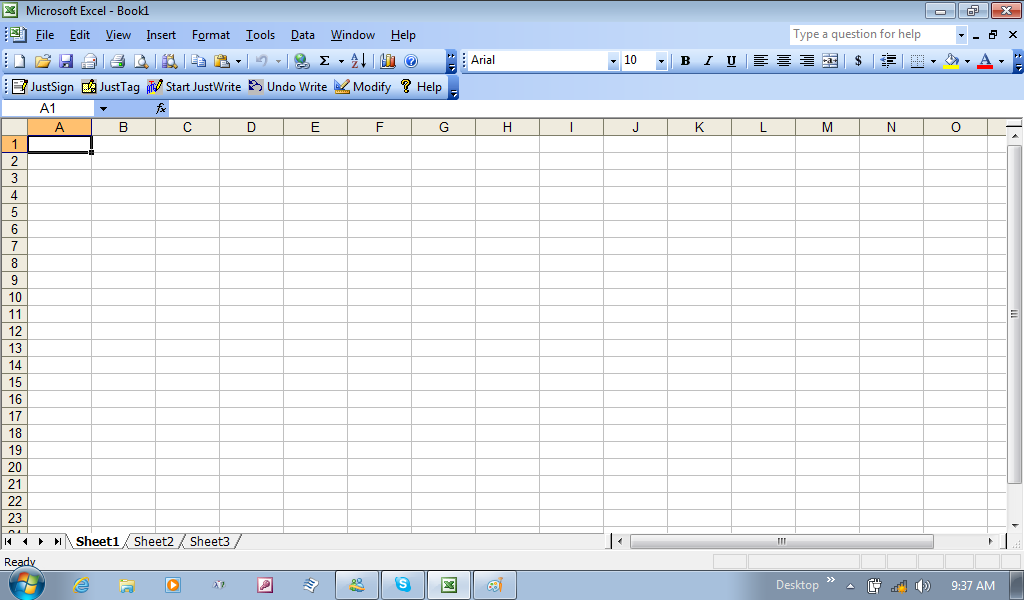
ExcelBlankBook1

      Note: You can always click on the pictures to get a better view.

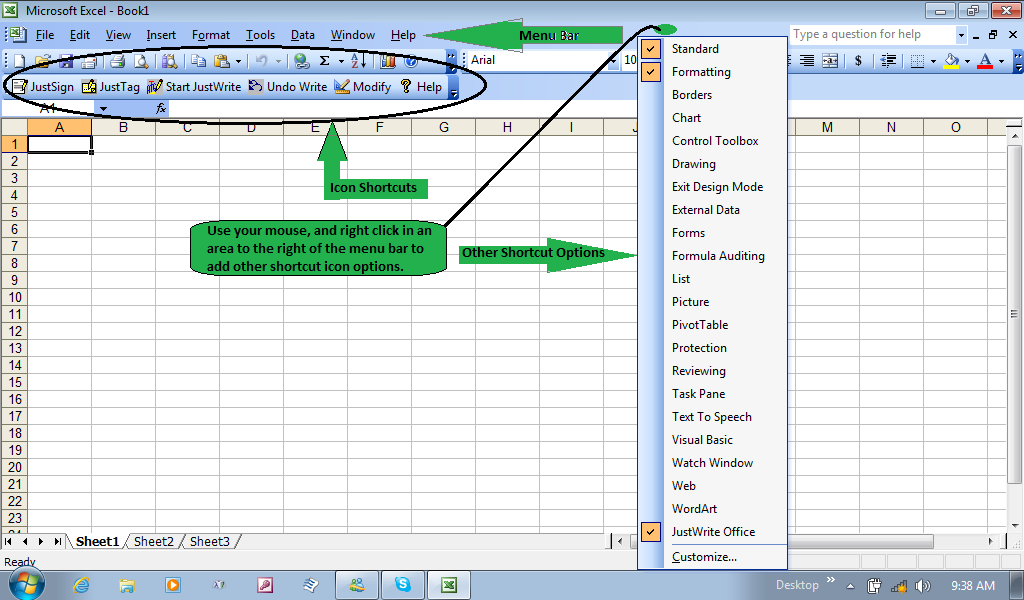
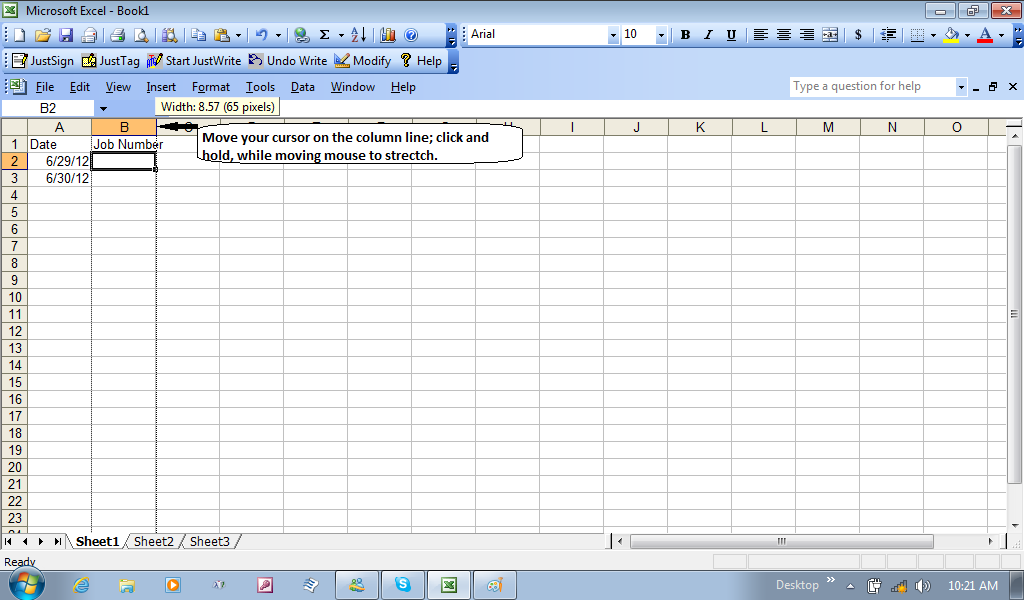
      Basically, when you start out with a spreadsheet, you want to use it to create a list of related information over a period of time. There blank workbook or spreadsheet starts out with simply grid lines (a version of a blank papExcelBlankBook1IconOptionser).  It has many tools that can be used. These can be added under the Menu bar, by right clicking just right of the menu bar of File, Edit, Tools, and Help. By experiment and exploring these icon shortcuts, will give you a better understanding of how useful an office program such as Microsoft excel can be.

Deciding how to start

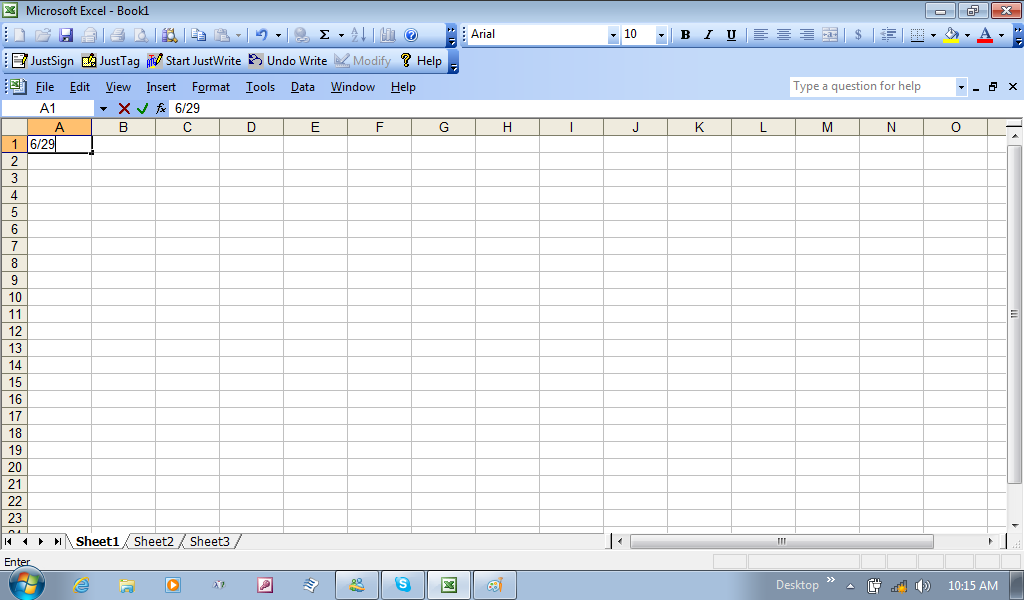
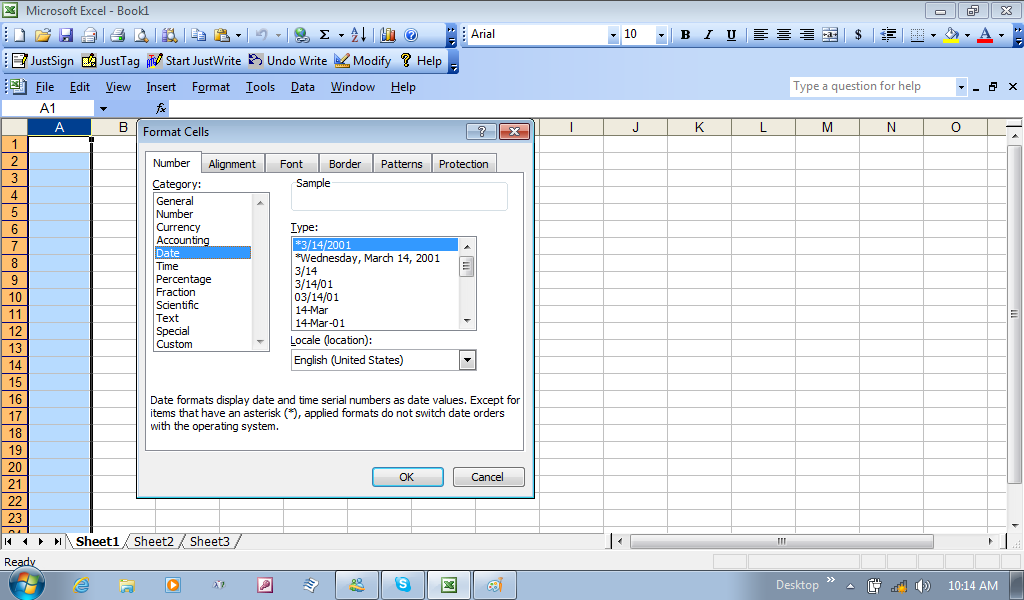
      It may take a little thought of how you want to list your information, but it is no different than if you were to start with a blank page. In this case, I was starting the first spread sheet (notice that in this office program, a blank workbook starts with three blank spreadsheets) for information relating to my pickup and delivery locations.  The first column would be the date the work was assigned to me.ExcelBlankBook1AColPartial Each square is called a cell, and they all start out in a general form, where it will try to figure out what you are attempting to use that cell for by how you type the information. Once you start with a couple of numbers and a slash follows, it figures it may be a date format you are creating. After you add the month and day, you can simply hit the return [enter] key, and it will add in the current year, as 2012. To give a short date format, you can right click on this given cell, and choose format type, and in the General tab category, click dateExcelBlankBook1IconFormatDate, and in the right window the type of date format you desire. To do this to the whole column, you click on the Column Field (in this case Column A), and it will highlight that whole column. Now, anytime I add in the Month and day, separated with a slash, and hit enter, the hole column will always finish with the year in the format I chose.


Adding Column Headers

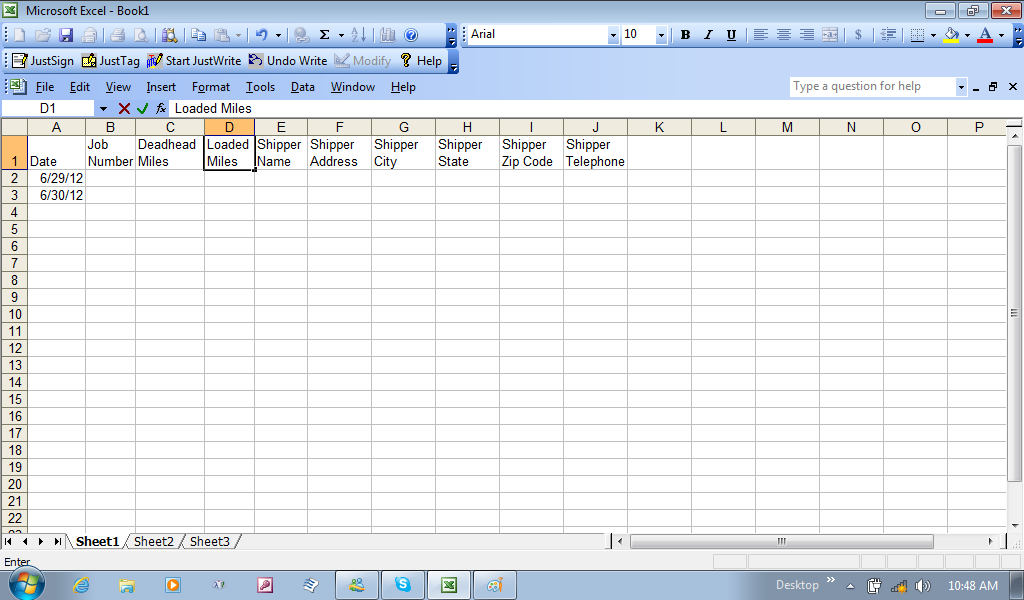
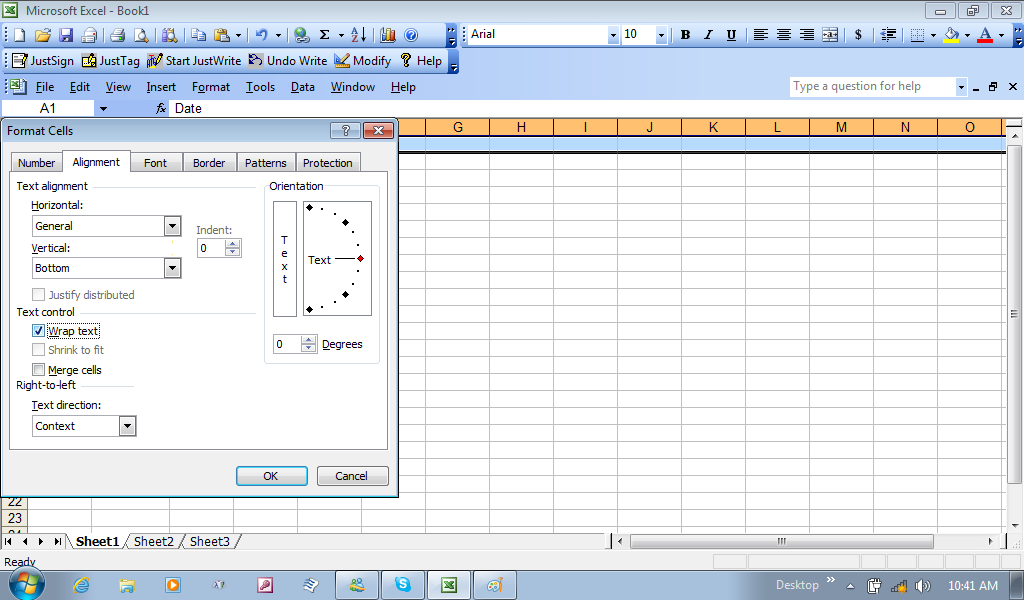
      Basically, you may want to first figure out what information you want to place in the first row, or in this case, start with the information you desire to add, and then go and add a new row above, and add the header for each column.ExcelBlankBook1InsertBlankRow By clicking on the number 1, for the first row, it highlights the entire first row, and then right clicking on number 1, I can choose Insert, and a blank row is added. As a note, you can add a row in between information, and that column format set for the column done previously will be carried into the new blank row. In short, that Date format would still work like how it was formatted before adding this row. Still, we can add text, without any affect, and the program sees it as text instead of a date.  But if we were to add numbers to that column, it would try to formulate into a date format. ForExcelBlankBook1AddedFields now, we will just add text, and call them headings for the columns, giving these columns purpose.  By highlighting the row, number 1 again, and right click, then click on Format Cells, I can click on the Alignment Tab, and look down the list of options, and check the wrap text box to keep the typing from spilling into the other columns.ExcelBlankBook1WrapText

      This will now let text wrap in the same cell. If you use the cursor and move it to any bordering column, you can stretch and shrink the size of the cell to give it the appearance you are comfortable with.ExcelBlankBook1StretchCol You can also resize a row in the same manner. As information added varies in the number of characters, you may need to stretch columns to get the desired information to be seen in full, and may happen often; thus, the “work always in progress”.  It sounds like work, but if you were to use a blank page, you would be erasing or starting over with a new page if you had to spread out your columns on paper. This is on computer, thus you save paper getting the appearance you are looking for.

Start Saving Your Work Often

      When I started out with computers, it was with an old Tandy keyboard, and I had to write the code to make the computer act the way I desired.  I could type for hours typing code. Well, where I resided, it appeared that the electric company would switch power stations around the same time in the afternoon. I would be so absorbed in my typing, time would come, the switching of power stations would happen on time, and there was a split second loss in power during the switching of stations. All that work would be lost. I needed to learn to save my work periodically. That way when the next time the power stations were switched, I didn’t lose all my code work.
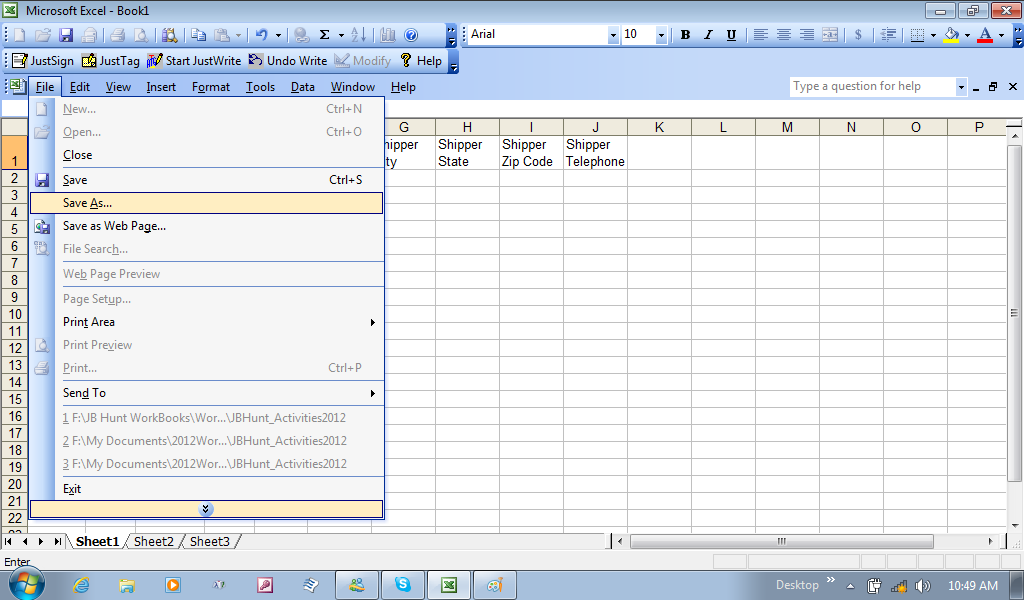
      We have just started, but already made various changes to the spreadsheet. Although this early is the time to save the file, and even give it a name.  Go up to the Menu bar, anExcelBlankBook1SaveAs1d click the file menu. The initial time you save this, you can simply click on save, but if this is was your second attempt, you might as well get in the habit of going down the list and choosing Save As for you initially new works. This way, you don’t overwrite a file with the same name.

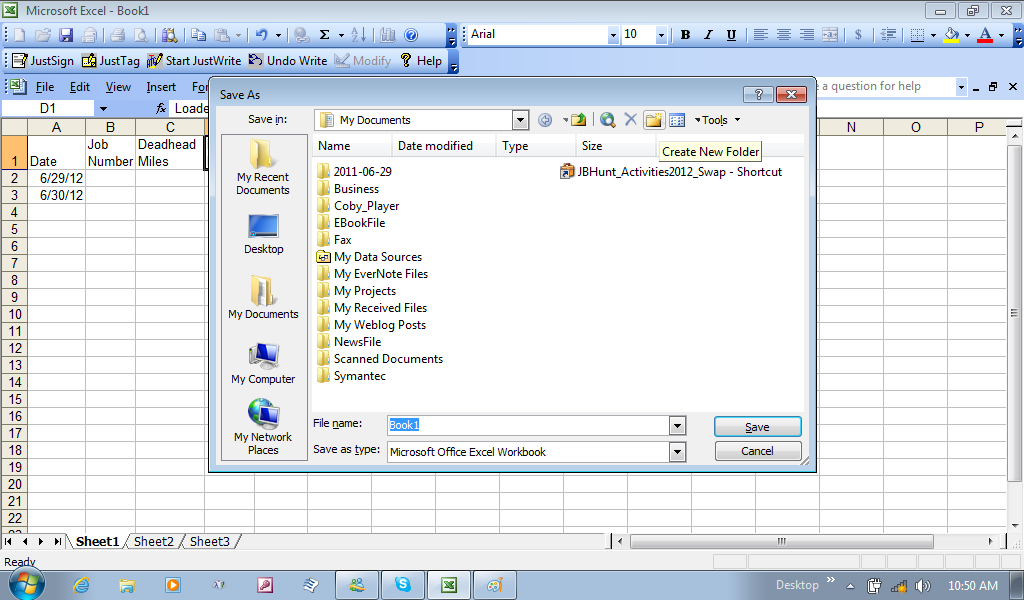
ExcelBlankBook1CreateNewFolder

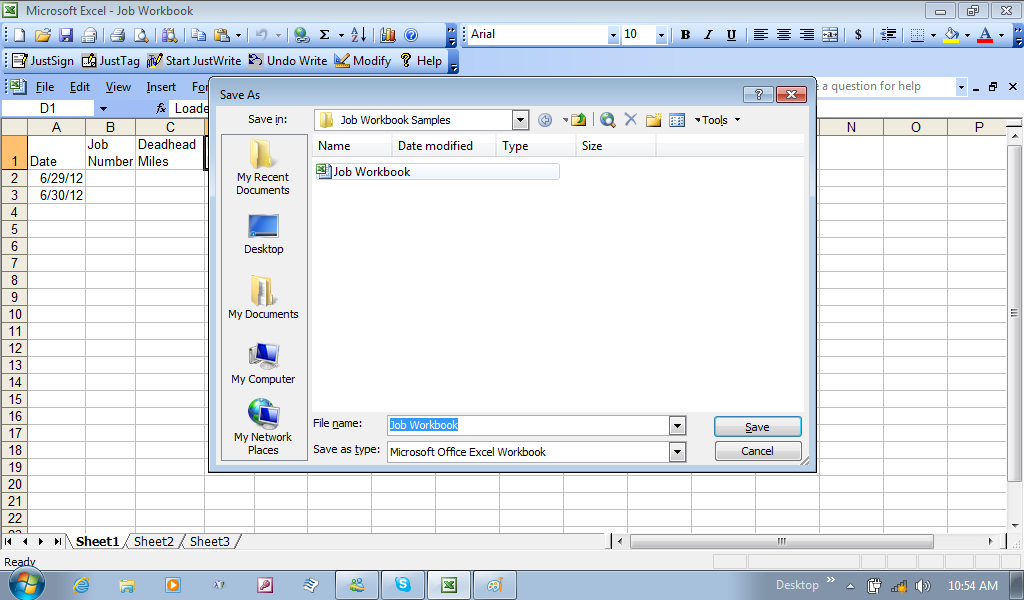
      This is also how you can create a new folder in the process, and decide where this folder is to be created, so as long as you know where it is, and begin organizing your My Documents Folder. By the way, you can always move folders into other folders, so dExcelBlankBook1FileNamingecide on how you wish to organize, and even categorize your folders. The next decision is the name of the file itself. I actually saved it once, and did the process again to show why going through the process of Save As  gives you the opportunity to see if you save a different file, with different information, but with the same name, the new file would “replace” the first file, and that first file would be gone. It was just an exercise to show you to always give the file a name different from others, and unique to the file you have created. From here, when you want to save this file, you can now just simply go to the file menu, and click save. It now will save any additions and changes to only the file you are working on.
Returning to Formatting Cells

      Remember how the date column was formatted? Well, if you didn’t explore the format options, this is a good time to assist with some other columns that have been given header names in the first row.JobWorkbookFormatPickupDate

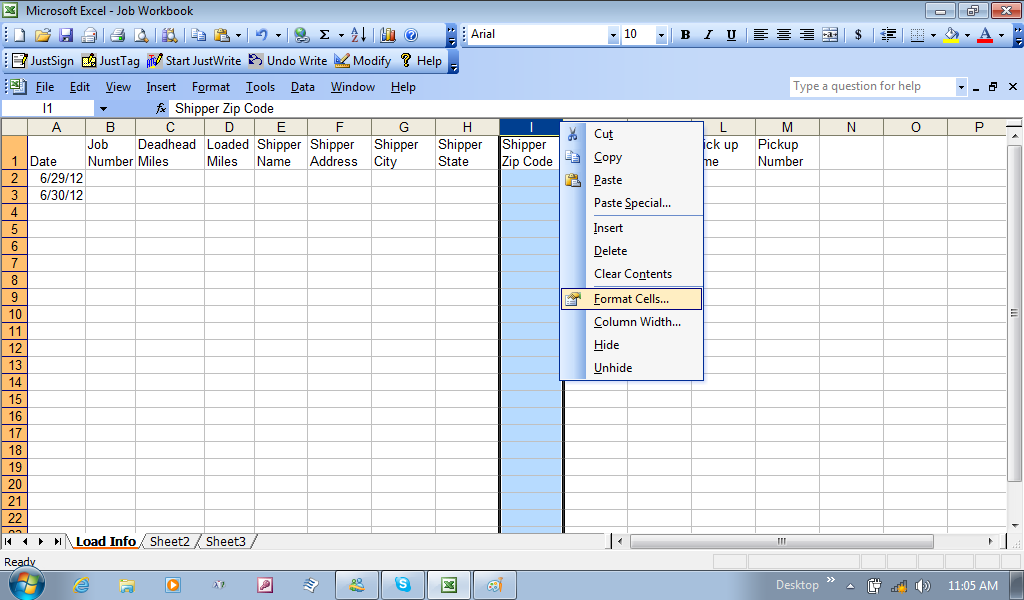
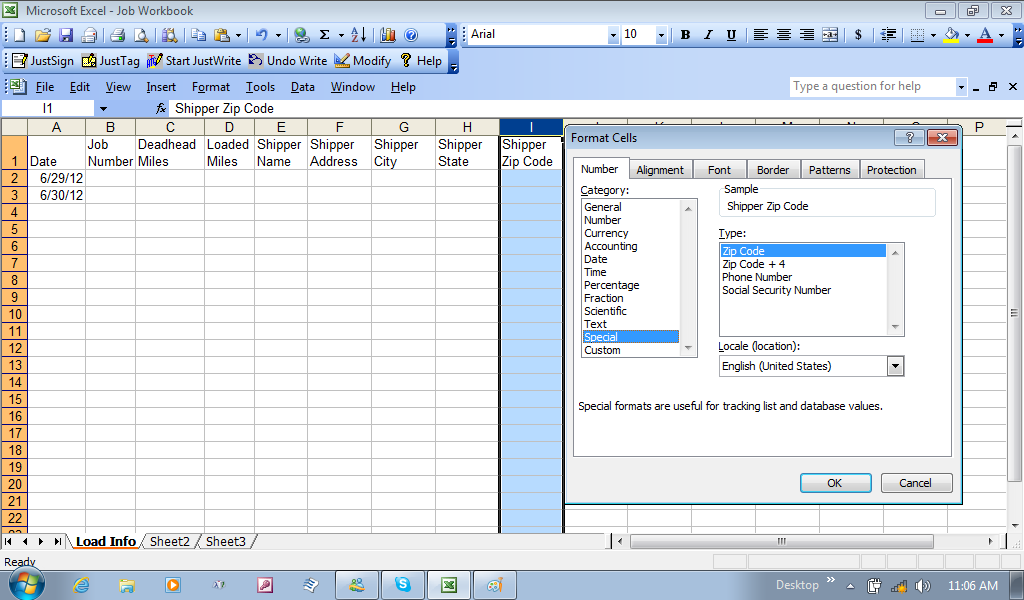
      The pick up date column can be highlighted by right-clicking on the “K” field column, and choosing the date category (just like I first started in Column A). The next column, Pick up Time, I right-click, and choose format cell, and again, look down the category to find time. Then, to the right, I can choose the type of format the computer will show the time. Now, you can also format the telephone number column, and the zip code column individually. JobWorkbookFormatZipCode

  Same process as everything else, by highlighting the whole column, then Format Cell, but in the category window, both zip code and telephone format types are found in the special category.

JobWorkbookFormatZipCodeSpecialCat

      After you have formatted column I, then you can format column J (the Shipper Telephone Number column). Remember, you are just starting out, so explore and experiment. After you have formatted the telephone number column, simply add in seven different numbers (no spaces or symbols) in a cell, hit the return [Enter] key, and see how the program formats the numbers. If you like it, remember to get rid of the random numbers, since you were just testing the cell. Now, go to the file menu bar, and click save. Remember to do this often. If your computer loses power, or other possibilities, it would loss the work recently done, and you would need to repeat these steps by opening the saved file again.

Renaming Spreadsheets

      As I mentioned before, an office workbook starts with three blank spreadsheets. You can add and delete spreadsheets, and you can rename them for what each sheet would represent.JobWorkbookRenamingSheet

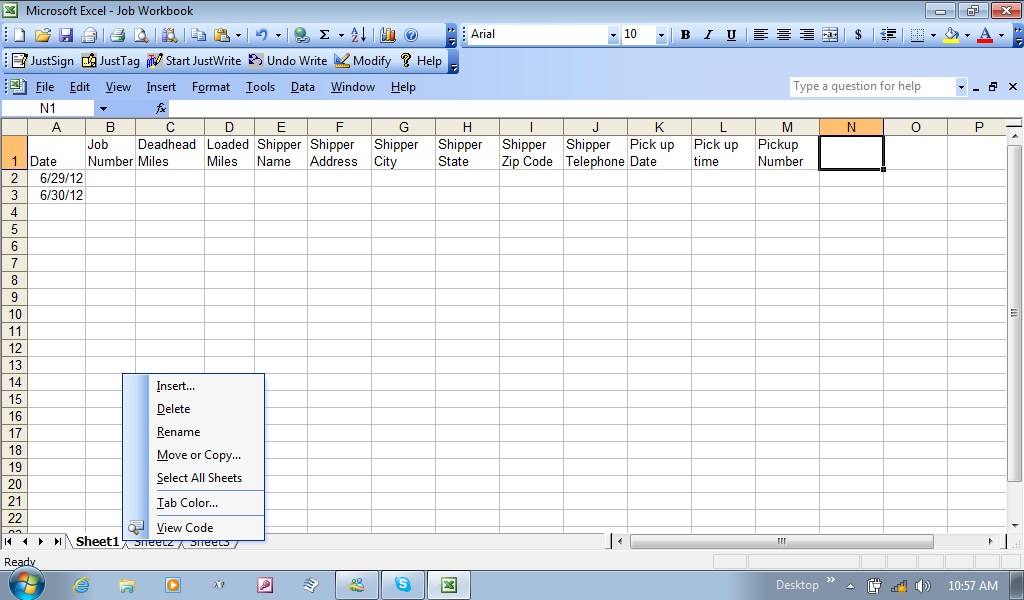
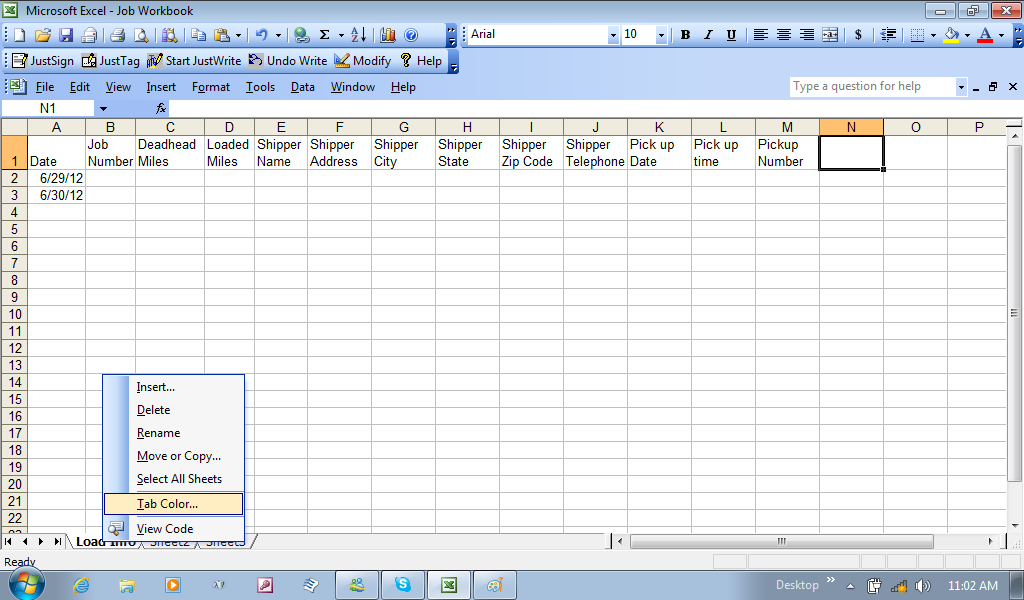
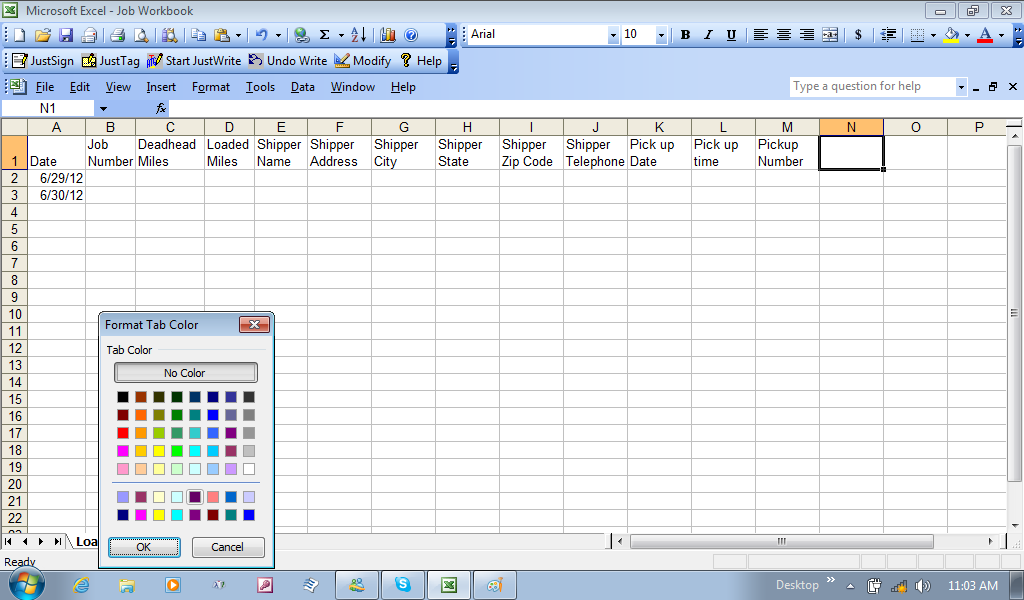
      By moving the cursor over Sheet 1 and right-clicking, I can now rename the sheet, in this case I named it to reflect this sheet was specifically load information. While I am at it, you can also give the sheet tab a different color, which can be a way of keeping specific files related to each other by color, or shades of the color. Let us say, we plan to use this sheet to list the loads I get for eachJobWorkbookTabColorSheet month. I can make copies of this sheet, and name them Jan2012, Feb 2012, March2012, etc. Other sheets for each month can be created later, like recaps. Then I can decide that LoadInfoJan2012 would be orange, and recapsJan 2012 could be a shade of orange. For now, just know, you can right-click on the sheet, click Tab color, and a color palette will give you a choice of colors.JobWorkbookTabColorPalette

      I think this will be the first of many blogs, just on this project file called Job workbook. In the meantime, before this becomes the true and important file used for your business, learn to explore and experiment with what has already been started. Also, get accustomed to the Help menu bar. This will open a help file where you can read on other abilities for the program, and even search for what you want to achieve or see. I’ll get back to this another day, using the same file. This way, you can experiment, without fear of losing anything. Honestly, unless you go to a book store, or order through Amazon.com, you can still learn from what you already have.
Posted in Spreadsheets & WorkBook | Tagged | Leave a comment

The Wonderful World of Plastic Manufacturing (Computer – Accessory Maintenance)

      I think I have made the statement that I was on a “Quest” to be able to run and operate an office on a computer, and upon a contract made a three year commitment to doing just that. Prior to this, I had already had a Commercial Driver’s License for three calendar years; but needed to always leave the truck and take time down to regain my confidence in driving in the Commercial world. With every Company I left, there was that moment of packing it all in. Honestly, I never tried to be a 48 State Commercial Driver, and only fate forced its hand on me.

      It wouldn’t be until just before the contract, and while doing a dedicated contract with another company that I realized, I needed to roam, and face any and all seasonal and weather conditions to make my quest a real goal. But there was more doubt from the beginning. In a sense, I always had a computer onboard, and was always building a reason to work with it, but like in previous blogs, there was endurance issues, and not knowing what would or wouldn’t work throughout any given time frame. My oldest computer (recently disposed of) was a Toshiba Satellite. It also was about seven years old when I started this in 2006. The first real issue was the aging hard drive (the old 3.5” Hard Drive), that made me learn that it could not run continuously, while the truck was hitting every bump and hole in the road.

      The next notebook was the DV 2200 (my very favorite, which I need to get another). It is here where the title of the Blog comes into play. I was working for a Refrigerated Trucking outfit, and ran mostly the East region of the Country. My initial worries was the heat and humidity; especially in its last living days, I was in Louisiana, in the beginning months of Summer, 2008. Much to my surprise, it was how I handled the machine, and not the dry heat that would end its operation. When I would again be in between companies, I made time to pull it apart (geek that I am), and found out that the plastic casing was strong and durable, but the aluminum braces inside (two of them)  were broke in half. Those braces were also designed to be part of the circuit board, and was used like grounding planes for various connecting areas of the circuit board. Losing that machine was so hardening to me, because of its size, speed, and functionality.

      I was back to repairing the Toshiba Satellite, and using it in between stops, and storing it in a computer case. It probably would have been the only computer I had, but those batteries were always needing to be replaced every eighteen months, and in those battery life span, the older it got, the more current it draws to be charged, meaning that when it was hooked to an inverter, it was pulling that much more current from the truck batteries. I had to plan my time on how long I could use it when the truck was not running. Still, it was the best machine to date, that held up to the working lifestyles of commercial trucking.

Rethinking my Office Operation

      There is no such thing a a useless computer. You just have to find the best purpose it can serve and be a benefit to you.

      I purchased the very first HP Mini netbook! It was the problem solver to all my durability issues. But like anything else, it had its own Pro’s and Con’s. The net books processors speed was slower. Which also meant that multi tasking gave it a slower performance. But because of the price, I came to realize that I could purchase three, for the price of the satellite I bought back in 1999 or 2000. The prices of today’s Toshibas are now about $600.00, but for just about $1000.00 I now had three separate machines (uh, doing the job of one Toshiba). I had to rethink how this was going to work. Based on the processor speed, one would be strictly dedicated to running my gps mapping program, which tracks where I go anytime the truck rolls. This turned out to be an EMachine Netbook, and much to my surprise, it continues to record the everyday movement to my truck (I am surprised, because I never upgraded the memory card…yet). It also became the main roll of my phone calls, now through the Skype Program. And, since it has a smaller hard drive in it, the machine takes on every bounce of the roadway.

      The original HP Mini would later be replaced with its newer version, the Mini 210-1010NR. This has now been my “main Office”, and the first and only mini with a memory upgrade (so far). This HP holds all my spreadsheet workbooks that cover every recorded loads, Submitted paperwork, Income and Expenses, all my Email. It started out as the roll of PC to Phone calls, but the EMachine seems to handle it much better. Way to go guys! Getting back to the HP Mini, it also is my File service, where all my completed loads are scanned to a file and stored in respective folders. It has been the only computer that has run my Driver’s Daily Log Program, coming up to my third year. This is the main office! Only recently has it showed signs of needing a slight repair, where the screen goes white, but that just might be a dirty contact switch for when you raise and lower the screen and lid.

      The Dell Inspiron Mini was the last machine purchased, in the fall of 2011. With the EMachine constantly running when the truck runs, and the HP Mini holding every business and financial purpose of being and Independent Contractor/ Sole Proprietor, the Dell mini, running the reliable Windows XP, and an atom possessor was just not to manage any of the other machines operation. But that was not why it was purchased. It was to become the entertainment portion of the business (and personally, it works the best when running videos). Giving the role and purpose of the Dell Mini lead to building up a routine for Blogging, and it holds all the picture and video files (both work related and personal), needed from finding a damaged trailer, and even snapshot files taken of the OBC messages. It really has limits to call it my studio, especially when using the Adobe Premier Elements 2.0 program, but the Microsoft Movie maker will do while on the road. In Adobe’s defense, the Premier was truly made for desktop operation and use, but that old Toshiba Satellite was the next best thing!

      Finally, there is the backups of files onto DVD, and the use of the DVD player. It is a toss between using the EMachine, and the Dell. The HP has its own purpose. I personally favor the EMachine.

      Three mini computers? Well, I have written about having redundancy on board. And, even though each machine is different with its own key characteristics, they can be used in replacement of the other; for as long as I stay patient. Temporary fix, until the main machine and its roles can be repaired and replaced. The next point is, the truck doesn’t always roll. DVD backups are only done monthly, and I cannot afford a library of action movies in these economic times. My point is, through any given day, only two computers may be on, not all three. For the most part, only one can be used at a time, so in theory, only one is running at any real given time. The whole idea is extending the life. No need to blog on the EMachine. It needs to only run when the truck is rolling, or for that emergency telephone call. If I’ am blogging, I am not working, and the HP mini needs to only be used for that next load call, income and expense recodring, scale records, and the next line on my log.

Getting back to the plastic story

      I also have two Epson printers onboard. The older, and more reliable Stylus C62 should be all I need…but the stores don’t always have that ink cartridge. The only reason why I bought the Epson NX 125. Of course, for $30.00, it also can scan, and sometime down the road, will fax. It was also a value for the scanner. I still rely on the old Cannon LIDE 30 portable scanner (the oldest accessory onboard). Having that redundancy and backup does come handy.

      So, am I ready to change the title of the blog? Hardly. Yes, I only mentioned the DV 2200 that now rests in a garage in Pennsylvania (in pieces). But that newer Epson NX 125, currently my main printer, has finally shown wear from the travels of the truck. To be fair, even the Canon (12 year old Canon!), is starting to skip on its old rubber belt. It seems that when it comes to the Epson NX 125 scanner operation, it won’t retract evenly for the next scan, and I had to learn to scan on it by tilting it on its side, so gravity would help the scanning photo eye return to its starting point evenly. Why not get it fixed? It was $30.00. How much to take it to a shop? Don’t ask. I found a way to use it, and in this rough environment, it will do just fine…for $30.00.

      Plastic seems to be the most amazing point to this story, because although some trim may break, or a cover may crack, the plastic casing to all these devices have shown its durability. With every device, care needs to become the users goal, whether storing everything in a case, or at least keeping it stored flat and out of the sun, these devices do hold up. The DV 2200 was in a backpack, and the backpack was dropped, and thus the metal supports inside cracked from shock. The Satellite had an eight year old Hard Drive in it, and after it was replaced, it held its own. The disposal of my most “prized possession” was from the need to lighten the inventory, should the contract fall apart. I kept that Hard Drive from it. 12 year ownership of a laptop. I did get my monies worth over time. It was a good machine. The final decision was based on those batteries, and the power it draws when plugged into an inverter. Three mini machines now replace it. My only regret was, there was nothing wrong with it. It was just time to move on.

      So, never underestimate something built inside a plastic casing, instead, know that care has to be your only concern, when it come to keeping it in good working order. Never store it in a back pack; make the investment, and get a decent computer carry case. Use the case to store the computer whenever it is not in use. As a truck driver, keep the printers, scanners, and other devices out of the sun. It will develop some kind of structural change. Use some kind of rubber matting underneath the printer and scanner, to absorb some shock from the bumps in the road.  Bottom line, its not the plastic that will be defective; its the care and operation, solely the responsibility of the user.

      To end this on a point, this blog was written in the summer of 2012. Make an investment in an external laptop fan, to sit your device on top of. This can be found at Best Buy, and sometimes even at a target or Wal-Mart. It doesn’t keep the plastic casing cool. It does provide more forced air to keep the processor cool; and, it doubles as a table for you lap. As far as these plastic casings; truly, an amazing manufacturing purpose that goes without being recognized!

Posted in Computers and Technology, Truck Driving | Leave a comment

The Wonderful World of Plastic Manufacturing (Computer – Accessory Maintenance)

      I think I have made the statement that I was on a “Quest” to be able to run and operate an office on a computer, and upon a contract made a three year commitment to doing just that. Prior to this, I had already had a Commercial Driver’s License for three calendar years; but needed to always leave the truck and take time down to regain my confidence in driving in the Commercial world. With every Company I left, there was that moment of packing it all in. Honestly, I never tried to be a 48 State Commercial Driver, and only fate forced its hand on me.

      It wouldn’t be until just before the contract, and while doing a dedicated contract with another company that I realized, I needed to roam, and face any and all seasonal and weather conditions to make my quest a real goal. But there was more doubt from the beginning. In a sense, I always had a computer onboard, and was always building a reason to work with it, but like in previous blogs, there was endurance issues, and not knowing what would or wouldn’t work throughout any given time frame. My oldest computer (recently disposed of) was a Toshiba Satellite. It also was about seven years old when I started this in 2006. The first real issue was the aging hard drive (the old 3.5” Hard Drive), that made me learn that it could not run continuously, while the truck was hitting every bump and hole in the road.

      The next notebook was the DV 2200 (my very favorite, which I need to get another). It is here where the title of the Blog comes into play. I was working for a Refrigerated Trucking outfit, and ran mostly the East region of the Country. My initial worries was the heat and humidity; especially in its last living days, I was in Louisiana, in the beginning months of Summer, 2008. Much to my surprise, it was how I handled the machine, and not the dry heat that would end its operation. When I would again be in between companies, I made time to pull it apart (geek that I am), and found out that the plastic casing was strong and durable, but the aluminum braces inside (two of them)  were broke in half. Those braces were also designed to be part of the circuit board, and was used like grounding planes for various connecting areas of the circuit board. Losing that machine was so hardening to me, because of its size, speed, and functionality.

      I was back to repairing the Toshiba Satellite, and using it in between stops, and storing it in a computer case. It probably would have been the only computer I had, but those batteries were always needing to be replaced every eighteen months, and in those battery life span, the older it got, the more current it draws to be charged, meaning that when it was hooked to an inverter, it was pulling that much more current from the truck batteries. I had to plan my time on how long I could use it when the truck was not running. Still, it was the best machine to date, that held up to the working lifestyles of commercial trucking.

Rethinking my Office Operation

      There is no such thing a a useless computer. You just have to find the best purpose it can serve and be a benefit to you.

      I purchased the very first HP Mini netbook! It was the problem solver to all my durability issues. But like anything else, it had its own Pro’s and Con’s. The net books processors speed was slower. Which also meant that multi tasking gave it a slower performance. But because of the price, I came to realize that I could purchase three, for the price of the satellite I bought back in 1999 or 2000. The prices of today’s Toshibas are now about $600.00, but for just about $1000.00 I now had three separate machines (uh, doing the job of one Toshiba). I had to rethink how this was going to work. Based on the processor speed, one would be strictly dedicated to running my gps mapping program, which tracks where I go anytime the truck rolls. This turned out to be an EMachine Netbook, and much to my surprise, it continues to record the everyday movement to my truck (I am surprised, because I never upgraded the memory card…yet). It also became the main roll of my phone calls, now through the Skype Program. And, since it has a smaller hard drive in it, the machine takes on every bounce of the roadway.

      The original HP Mini would later be replaced with its newer version, the Mini 210-1010NR. This has now been my “main Office”, and the first and only mini with a memory upgrade (so far). This HP holds all my spreadsheet workbooks that cover every recorded loads, Submitted paperwork, Income and Expenses, all my Email. It started out as the roll of PC to Phone calls, but the EMachine seems to handle it much better. Way to go guys! Getting back to the HP Mini, it also is my File service, where all my completed loads are scanned to a file and stored in respective folders. It has been the only computer that has run my Driver’s Daily Log Program, coming up to my third year. This is the main office! Only recently has it showed signs of needing a slight repair, where the screen goes white, but that just might be a dirty contact switch for when you raise and lower the screen and lid.

      The Dell Inspiron Mini was the last machine purchased, in the fall of 2011. With the EMachine constantly running when the truck runs, and the HP Mini holding every business and financial purpose of being and Independent Contractor/ Sole Proprietor, the Dell mini, running the reliable Windows XP, and an atom possessor was just not to manage any of the other machines operation. But that was not why it was purchased. It was to become the entertainment portion of the business (and personally, it works the best when running videos). Giving the role and purpose of the Dell Mini lead to building up a routine for Blogging, and it holds all the picture and video files (both work related and personal), needed from finding a damaged trailer, and even snapshot files taken of the OBC messages. It really has limits to call it my studio, especially when using the Adobe Premier Elements 2.0 program, but the Microsoft Movie maker will do while on the road. In Adobe’s defense, the Premier was truly made for desktop operation and use, but that old Toshiba Satellite was the next best thing!

      Finally, there is the backups of files onto DVD, and the use of the DVD player. It is a toss between using the EMachine, and the Dell. The HP has its own purpose. I personally favor the EMachine.

      Three mini computers? Well, I have written about having redundancy on board. And, even though each machine is different with its own key characteristics, they can be used in replacement of the other; for as long as I stay patient. Temporary fix, until the main machine and its roles can be repaired and replaced. The next point is, the truck doesn’t always roll. DVD backups are only done monthly, and I cannot afford a library of action movies in these economic times. My point is, through any given day, only two computers may be on, not all three. For the most part, only one can be used at a time, so in theory, only one is running at any real given time. The whole idea is extending the life. No need to blog on the EMachine. It needs to only run when the truck is rolling, or for that emergency telephone call. If I’ am blogging, I am not working, and the HP mini needs to only be used for that next load call, income and expense recodring, scale records, and the next line on my log.

Getting back to the plastic story

      I also have two Epson printers onboard. The older, and more reliable Stylus C62 should be all I need…but the stores don’t always have that ink cartridge. The only reason why I bought the Epson NX 125. Of course, for $30.00, it also can scan, and sometime down the road, will fax. It was also a value for the scanner. I still rely on the old Cannon LIDE 30 portable scanner (the oldest accessory onboard). Having that redundancy and backup does come handy.

      So, am I ready to change the title of the blog? Hardly. Yes, I only mentioned the DV 2200 that now rests in a garage in Pennsylvania (in pieces). But that newer Epson NX 125, currently my main printer, has finally shown wear from the travels of the truck. To be fair, even the Canon (12 year old Canon!), is starting to skip on its old rubber belt. It seems that when it comes to the Epson NX 125 scanner operation, it won’t retract evenly for the next scan, and I had to learn to scan on it by tilting it on its side, so gravity would help the scanning photo eye return to its starting point evenly. Why not get it fixed? It was $30.00. How much to take it to a shop? Don’t ask. I found a way to use it, and in this rough environment, it will do just fine…for $30.00.

      Plastic seems to be the most amazing point to this story, because although some trim may break, or a cover may crack, the plastic casing to all these devices have shown its durability. With every device, care needs to become the users goal, whether storing everything in a case, or at least keeping it stored flat and out of the sun, these devices do hold up. The DV 2200 was in a backpack, and the backpack was dropped, and thus the metal supports inside cracked from shock. The Satellite had an eight year old Hard Drive in it, and after it was replaced, it held its own. The disposal of my most “prized possession” was from the need to lighten the inventory, should the contract fall apart. I kept that Hard Drive from it. 12 year ownership of a laptop. I did get my monies worth over time. It was a good machine. The final decision was based on those batteries, and the power it draws when plugged into an inverter. Three mini machines now replace it. My only regret was, there was nothing wrong with it. It was just time to move on.

      So, never underestimate something built inside a plastic casing, instead, know that care has to be your only concern, when it come to keeping it in good working order. Never store it in a back pack; make the investment, and get a decent computer carry case. Use the case to store the computer whenever it is not in use. As a truck driver, keep the printers, scanners, and other devices out of the sun. It will develop some kind of structural change. Use some kind of rubber matting underneath the printer and scanner, to absorb some shock from the bumps in the road.  Bottom line, its not the plastic that will be defective; its the care and operation, solely the responsibility of the user.

      To end this on a point, this blog was written in the summer of 2012. Make an investment in an external laptop fan, to sit your device on top of. This can be found at Best Buy, and sometimes even at a target or Wal-Mart. It doesn’t keep the plastic casing cool. It does provide more forced air to keep the processor cool; and, it doubles as a table for you lap. As far as these plastic casings; truly, an amazing manufacturing purpose that goes without being recognized!

Posted in Computers and Technology, Truck Driving | Leave a comment

The Need To Expand On A Netbook

    Every Laptops, notebook, and netbook  already has a keyboard and touch pad in place of a mouse, and serves very well on its own, as a DSCF0011bought and ready to go computer. But when it becomes a machine for work, and is used daily, there comes a time when you wish to consider the amount of constant use of the keyboard and touchpad. Then, there is the factor of the touchpad’s sensitivity on some models. In short, there is a feeling of more control using a mouse. The idea of the externally connecting keyboard also holds a few values, such as  the ability to set the computer to a corner, as a safe location, and allow the keyboard and mouse to take on the abuse, neglect, and occasional accident of spillage, especially when you are just relaxing (the time when some clumsy actions become most prevalent).

      The other reason is sometimes feeling to close to the computer, especially when the need to utilize the area for other things like organizing papers, and even stretching out. Without the keyboard and mouse connection, you can sometimes feel like you are centered on the computer, and “cramped” around using the space to the right and left of you for the documents. When attaching a wireless combination, the freedom of placing the computer away from the desired work area, allows you to just focus on the work. No need to even worry about damage, after all, if you damage a $40.00 keyboard, you are only needing to save up another $40.00. The cheapest Netbook is still around $300.00, and repairs vary, but will go more than that $40.00 investment to expand to.


Nothing Like “Mouse Control”

      It was the greatest invention to add a touchpad into the computer, with the keyboard to boot! But, sometimes the sensitivity of the touchpad, and even some other advanced features, may cause you to focus more on the actions of your fingertips, rather than where you are placing the cursor. It is not really taking away, since undoing an accidental tap, orDSCF0017 resizing, and even scrolling back, but it takes away the relaxing experience from time to time, and returns to more focus (and like work attitude). When typing, many touchpad controls do allow you to turn it off, because, while typing, a slight touch of that pad may act like an intentional “command”, as if “virtually” spilling coffee ( a theory not a concept). Over time, we have just grew up with the mouse in hand, and the proficiency we obtained pleads to be exercised.

      Don’t ever let them take away that touchpad! Having it there when walking around and being portable, means less equipment to carry too. But, when it comes to several hours of stationary work, the external keyboard and mouse brings you closer to a small version of that office desktop. It is a nice change of atmosphere too (then again, it just may be me).

Posted in Computers and Technology | Leave a comment

      There are times like this when sulking over the lost time and losing the opportunity to make money would be a waste of time in itself. Everything I could get done at a truck stop, short of my laundry, was done, and rather than invest the time in my future business plan, I decided laundry was a priority, and chose to get closer to my next load assignment, and find a stop with some machines. I found that stop at the Pine Cove Travel Plaza, off I-94, in Johnson Creek, Wisconsin. The first thing that came to my liking was that it was located behind an outlet, Johnson Creek Premium Outlets, on WI 26. On the other side of the interstate was a Wal-Mart. I loved it. But first, time to settle in, and sleep.

      The sun edged through the cracks in the curtain, and I naturally woke up at about 5:00 A.M.  I have always been slow to get my act together, except when it was time to roll for an appointment. This morning, I made the investment to use fuel to get to those machines, laundry was the first thing on my list, and the rest of my casual plans could be decided while doing this chore. I got a Blog out for the 100 Day Countdown Blog, and got the close folded and put in their place. I actually find Blogging a pass time, while doing laundry. It never has to be that long, and you get to express yourself, and where you have been.

      With a little breakfast brought back to the truck, it was time to clean the truck, sort of, but it is presentable. Then, it was time to just take a little walk. I haven’t been able to make this a daily exercise, but when I can, I walk the lot of some of these outlets and malls, to window shop, and exercise. It’s hard to run in work boots. Starting out at 9:00 A.M., I’d be back to the truck by 9:40. From there, the trailer was swept out for the next customer.

      Remembering the one store, Direct Tools Factory Outlet, I thought I would inquire about a broken switch one one of my table tools at home. I got a list of other store locations, and like Staples, Wal-Mart, and Dollar General, I now have a resource for other projects, in this case, not totally computer or truck related. I have carried around some battery operated power tools for the last two years, hoping I would put to use the tools to create a craft out of wood, for whatever purpose, and make the projects no more than two hours at a time, especially for those 34 hour breaks. But with everything else on my mind, the inspiration never came…until now. I walked out with a package of saw blades for my battery operated saw. Next 34 hour break has to include a Home Depot for some small supplies, and in between, I’ll need to focus on a project. Two already came to mind.

      By eleven O’clock, I was back in the truck, to do this quick “down time” Blog, before a nap, for about an hour. Then it will be time to switch gears, and focus on rolling towards Milwaukee, and from there south east, until midnight.

Posted on by tharrisfc | Leave a comment